
Introduction
The GPUs arrive on schedule. Weeks later, the cluster still isn’t running training jobs at the speed you paid for. That gap comes from power feeds that can’t carry the load, cooling that can’t remove the heat, a network nobody tuned, and testing that was cut when the schedule slipped. The effect shows up even at the top end.
Most enterprise builds are far smaller, but they run into the same kinds of problems. This guide covers GPU cluster deployment in the order it happens: planning, rack integration, networking, software bring-up, and validation. It also lists the common mistakes and shows how Aptly Technology supports each stage.
What Is GPU Cluster Deployment?
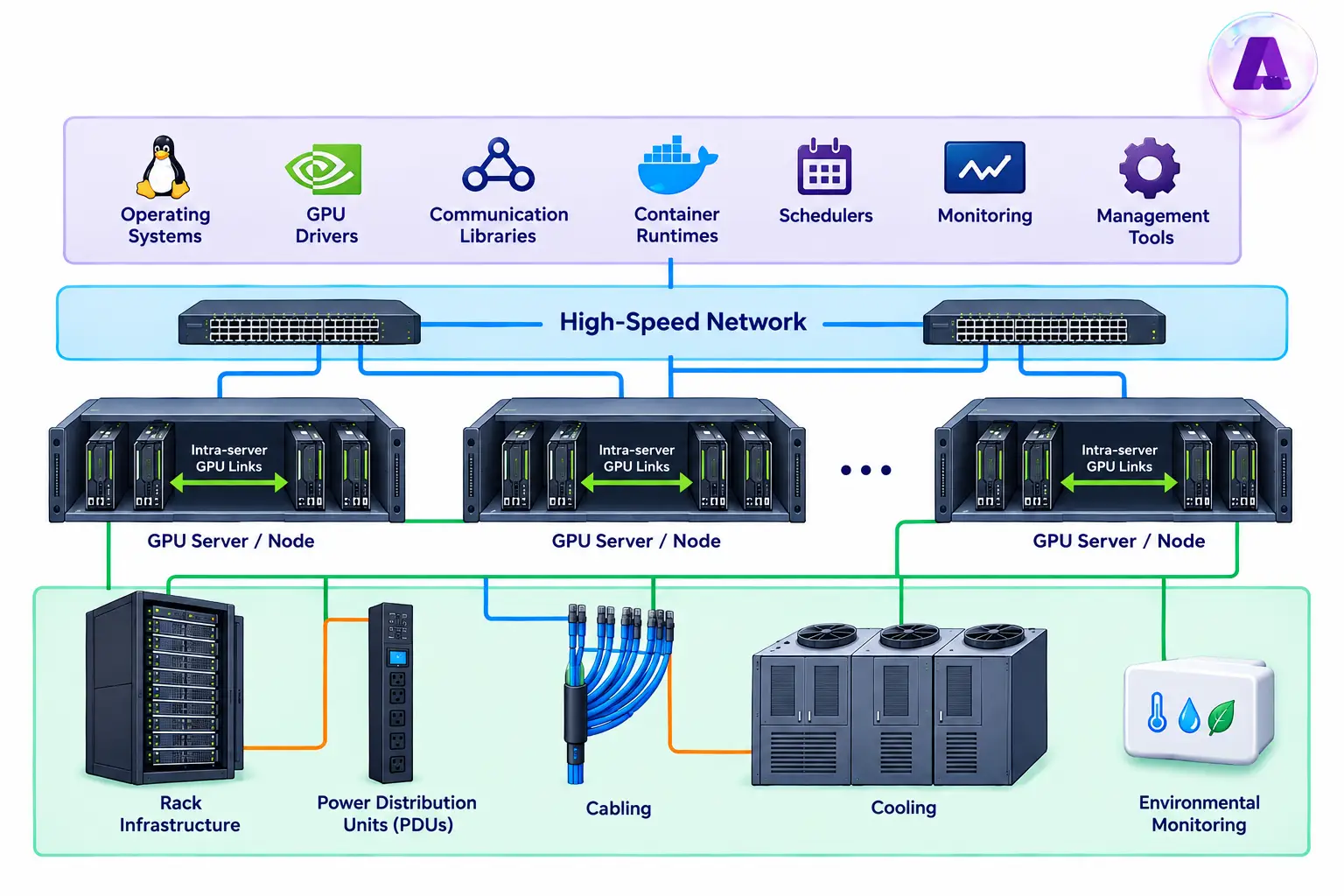
GPU cluster deployment is the process of installing, connecting, configuring, and testing multiple GPU servers so they can run workloads together. Depending on the design, a cluster may support large language model training, fine-tuning, AI inference, analytics, simulation, or other high-performance computing tasks.
A GPU deployment includes:
Planning Requirements Before You Rack Anything
Before installing GPU servers into racks, enterprises must assess power capacity, cooling requirements, rack density, network architecture, and physical space to ensure the infrastructure is ready for deployment.
Define the workload and cluster requirements
Begin GPU cluster planning by identifying the workloads the infrastructure must support. Define the expected model sizes, GPU count, number of nodes, job concurrency, data access patterns, availability targets, and anticipated growth. These requirements help determine the appropriate cluster configuration, GPU allocation, networking architecture, and storage capacity.
Aptly can help enterprises translate workload requirements into a suitable GPU cluster design, deployment priorities, and measurable acceptance criteria.
Check power, cooling, and rack capacity
Confirm rack dimensions, floor loading, electrical capacity, PDU ratings, circuit redundancy, cable routes, and service clearances. Check the facility’s cooling design against the selected server configuration and expected load. For liquid-cooled systems, confirm compatibility with the facility’s coolant distribution, flow, temperature, pressure, and leak-detection requirements.
Hardware specifications can vary by form factor. NVIDIA lists H100 SXM configurations with a maximum thermal design power of up to 700 W per GPU, while H100 NVL specifications list 350-400 W depending on configuration. Actual facility planning must account for the complete system, including CPUs, memory, networking, power conversion, cooling overhead, and vendor-defined operating limits.
Confirm compatibility and dependencies
Before installation, check the supported combinations of server firmware, GPU firmware, drivers, operating system, CUDA components, network adapters, switches, and management tools. Record approved versions and verify that required cables, transceivers, rails, and accessories have arrived. A pre-deployment checklist helps avoid discovering compatibility or site-readiness gaps after equipment is mounted.
Aptly’s design validation reviews PDU capacity, cooling capacity, thermal zoning, and fabric topology against your AI workload roadmap and GPU density, before anything ships.
GPU Rack Integration
Rack integration is where the plan meets the physical room: weight, airflow, power balance, and cable runs. Here are the steps in GPU rack integration:
Step 1: Receive and stage
Inventory every node, match serial numbers to the order, and record firmware versions for the BIOS, BMC, NICs, and GPUs before anything goes in a rack. Mismatched versions are much easier to fix on a staging bench than in a live row.
Step 2: Layout
Put the heaviest nodes low, and use a server lift, since a DGX B200 weighs up to 142.4 kg. Keep airflow direction the same across the row, leave space for growth, and place leaf switches close to the nodes they serve so cable runs stay short.
Step 3: Power
Balance load across PDUs and feeds. NVIDIA ships DGX systems with locking power cords and advises using only those. Label each cord to its PDU outlet.
Step 4: Cabling
Label both ends of every cable. The DGX B200 ships without network cables, and the supported cable and adapter list depends on the ConnectX-7 firmware version, so confirm it before you order optics.
Step 5: Out-of-band management
Connect each node’s BMC to a separate management network. The DGX B200 BMC supports Redfish, IPMI, and a web interface, which lets you power-cycle and reflash nodes without a trip to the data hall.
How Aptly Helps in GPU Rack Integration
Aptly works with NVIDIA and Supermicro to deliver integrated GPU racks. Each rack goes through power mapping, structured cabling, airflow optimization, and factory burn-in, with uniform BIOS and firmware baselines, before it reaches your site. Aptly then handles rack acceptance testing and on-site commissioning.
GPU Cluster Networking
A GPU cluster needs four networks:
- Compute fabric: Carries GPU-to-GPU traffic between nodes. A DGX B200 has eight ConnectX-7 NICs, one per GPU, each running up to 400 Gb/s, InfiniBand by default or Ethernet as an option.
- Storage network: Keeps dataset reads and checkpoint writes off the compute fabric. The DGX B200 uses two separate BlueField-3 cards for storage and in-band management.
- Management network: Out-of-band access to each BMC, kept apart from everything else.
- Uplink: Connects the cluster to users, data sources, and the wider network.
Here are the steps in GPU cluster networking:
Step 1: Choose the network for the workload
InfiniBand, RoCE, and NVLink are common options for high-performance communication between GPU nodes. Here are InfiniBand vs. RoCE vs. NVLink differences for GPU clusters:
| Evaluation factor | InfiniBand | RoCE | NVLink |
| Performance consistency | High | Depends on network tuning | High within supported GPU interconnect domains |
| Tuning effort | Moderate | High | Low to moderate |
| Ecosystem | Specialized HPC and AI networking | Ethernet-based infrastructure | NVIDIA GPU interconnect ecosystem |
| Team skills | InfiniBand and fabric management | Ethernet, RDMA, and congestion control | GPU architecture and NVLink topology |
| Direction | Best for large-scale, distributed AI workloads | Best when Ethernet integration is a priority | Best for high-speed GPU-to-GPU communication |
If you want the shortest path to predictable performance, InfiniBand is the usual pick. If your organization standardizes on Ethernet and has engineers who can tune a lossless fabric, RoCE is a sound choice. The Ultra Ethernet Consortium’s 1.0 specification is worth following, but check vendor support for your exact hardware before you plan around it.
NVLink serve a different purpose. On supported systems, it provide high-bandwidth GPU-to-GPU communication inside a server or platform. NVLink do not replace the inter-node network required when distributed workloads span multiple servers.
Step 2: Configure the network
Verify adapter and switch compatibility, firmware, transceivers, cable types, link speeds, port status, addressing, routing, and any required subnet management. For RoCE, review MTU consistency, congestion controls, and lossless Ethernet settings according to the chosen architecture and vendor guidance. Keep management and storage traffic separate from the GPU data path when the design calls for it.
Step 3: Validate the network
Measure bandwidth and latency across the paths that workloads will use. Check error counters and congestion indicators, and run supported RDMA or collective-communication tests. A link can report as active while still delivering inconsistent performance or failing under concurrent traffic.
How Aptly helps in GPU cluster networking
Aptly deploys and configures InfiniBand, NVLink, and RoCE Ethernet fabrics, then runs port validation, redundancy and failover tests, and topology diagnostics to prevent link-down incidents. Network security, VLAN segmentation, and secure out-of-band management are set up as part of the same work.
GPU Software Stack and Bring-Up
Hardware that is racked and cabled still isn’t a cluster. Software bring-up is where mismatched versions turn into problems that are slow to trace.
- One golden image: Pin the OS, GPU driver, CUDA, container runtime, and fabric software versions, and apply them to every node. NVIDIA’s DGX systems ship with a pre-installed stack that includes the GPU driver with CUDA, Docker Engine, the NVIDIA Container Toolkit, and the DOCA-OFED networking software.
- Repeatable provisioning: Use bare-metal imaging and configuration management so a replaced node comes back identical to the rest.
- Scheduler choice: Slurm suits batch training with queued jobs. Kubernetes suits teams that run inference services and shared platforms. Many clusters run both.
- Monitoring from day one: NVIDIA’s DCGM and NVSM tools cover GPU and node health. Feed them into the same dashboards as network counters, so a slow job can be traced to a GPU, a link, or a storage path.
GPU Cluster Validation and Commissioning
Validate a GPU cluster in layers, from one node up to a real workload, and don’t move to the next layer until the current one passes. In Meta’s Llama 3 run, faulty GPUs caused 30.1% of unexpected interruptions and GPU HBM3 memory another 17.2%, and a single GPU failure can force a restart of the whole job. Faults like these are cheaper to find on day one than in week three of a training run.
Let’s check what should be tested before a GPU cluster goes into production:
Single-node hardware health and burn-in
NVIDIA’s Data Center GPU Manager (DCGM) diagnostics are designed to assess single-node health before workloads are deployed. It can also exercise areas including memory, compute, PCIe, NVLink, power, and thermal behaviour, depending on the selected tests and hardware. For this,
- Check GPU visibility, memory health, ECC events, temperatures, power behaviour, PCIe status, and system logs.
- Run vendor-recommended diagnostics and sustained tests that reflect the platform’s operating limits
- Monitor for unexpected restarts, thermal throttling, unstable power behaviour, and errors that appear only after the system has been under load.
- Schedule diagnostics carefully. Since active tests consume resources and can interfere with running jobs, run them on idle or drained nodes according to the vendor’s guidance.
Network and multi-node communication
Test the network from node to node Measure throughput and latency, check errors, and verify that GPU communication libraries can use the intended paths. Run multi-node tests appropriate to the platform and workload. Single-node tests alone cannot establish that a distributed training cluster is ready.
Compared to single node, separate multi-node diagnostics are designed to stress GPUs and interconnects across hosts on supported systems. So, select tools that match the actual topology and software stack rather than treating one successful test as universal proof of readiness.
Benchmark real workloads
Benchmarking should answer a practical question: does the deployed cluster meet the agreed performance and reliability targets for the workloads it will run? For this,
- Establish a performance baseline for individual nodes and for the cluster as a whole.
- Use GPU compute and memory tests, network benchmarks, collective-communication tests, and representative distributed training or inference workloads.
- Record the software versions, test parameters, duration, temperatures, power readings, and results so future comparisons are meaningful.
- Look for uneven performance between nodes, scaling that falls short of expectations, high communication overhead, and slowdowns that correlate with temperature or power limits.
Confirm operational readiness
A cluster should not be described as production-ready while critical faults remain unexplained or required checks have been skipped. Before handover,
- Verify monitoring and alerts, remote management access, logging, scheduler integration, storage access, escalation paths, and recovery procedures.
- Document test evidence, unresolved issues, owners, and acceptance decisions.
How Aptly helps in GPU cluster validation
Aptly runs thermal, PCIe, and NVLink stress tests on every node and interconnect path, then benchmarks with NVIDIA Nsight, DCGM, Lambda Benchmark, and MLPerf workloads. Each cluster gets a performance and reliability certification report, as-built documentation, operational runbooks, and a formal acceptance sign-off before it moves to steady-state operations.
GPU Cluster Deployment Checklist
| Deployment checklist | Status |
| Workload, architecture, capacity, and acceptance criteria documented | ☐ |
| Rack space, weight limits, power capacity, and redundancy verified | ☐ |
| Airflow or liquid-cooling requirements checked against vendor guidance | ☐ |
| GPU servers, switches, power feeds, and cables installed and labeled | ☐ |
| Firmware, drivers, operating system, and libraries aligned to an approved baseline | ☐ |
| InfiniBand or RoCE topology and required configuration verified | ☐ |
| NVLink/NVSwitch status checked where applicable | ☐ |
| GPU diagnostics and burn-in tests completed and results retained | ☐ |
| Network bandwidth, latency, errors, and multi-node communication tested | ☐ |
| Representative performance benchmarks completed against agreed targets | ☐ |
| Monitoring, alerts, management access, and escalation process verified | ☐ |
| Open issues documented and acceptance sign-off recorded | ☐ |
Common GPU Cluster Deployment Mistakes
Most delayed AI infrastructure deployments repeat the same five mistakes.
1. Underestimating power and cooling: The IEA estimates that about 20% of planned data centre projects could face delays from grid constraints.
Fix: confirm capacity and lead times in writing before you order hardware.
2. Mixed firmware and driver versions: Nodes behave differently, and jobs fail in ways that are hard to reproduce.
Fix: one golden image and a recorded firmware baseline.
3. Skipping burn-in when the schedule slips: Early hardware faults then show up in production.
Fix: treat burn-in as a fixed step in the plan, not as buffer time.
4. Treating the network as an afterthought: Cables, optics, and fabric settings decide how fast the cluster runs.
Fix: order optics with the servers and validate the fabric before the first job.
5. No baseline. Without day-one numbers, later slowdowns can’t be diagnosed.
Fix: save every validation result as the reference.
The remedy is not more paperwork for its own sake. It is a deployment process that defines production-ready, tests those conditions, and records the evidence.
On-Prem vs. Cloud GPU Cluster Deployment
On-prem or colocation tends to win when GPU use is steady and data must stay put. Cloud tends to win when you need capacity fast or your demand is uneven.
| Factor | On-prem or colocation | Cloud |
| Cost at steady, high utilization | Often lower over the hardware’s life | Pay-as-you-go; costs add up under constant use |
| Data control | Full control over where data sits and who touches it | Depends on provider and region options |
| Capacity | Yours once delivered and validated | Subject to provider availability and quotas |
| Time to start | Weeks to months for build and validation | Minutes to days |
| Staffing | Needs infrastructure, network, and operations skills | Provider manages the hardware |
Many enterprises land on a hybrid approach: steady training and sensitive inference on their own infrastructure, with cloud capacity for bursts and experiments. Aptly has delivered GPU clusters across Azure regions and enterprise data centers, so the same team can support an on-prem build, a colocation deployment, or a hybrid design.
Why Aptly Technology for GPU Cluster Deployment?
Aptly Technology designs, integrates, validates, and operates AI data center infrastructure, so one team can take a cluster from design review to production support.
- Hyperscale track record: Aptly is the only Microsoft-trusted supplier authorized to build and support third-party hyperscale data centers worldwide, and it has delivered and operated tens of thousands of GPU nodes, InfiniBand fabrics, and AI-optimized clusters across multiple Azure regions and enterprise data centers.
- A faster start: Through its partnership with NVIDIA and Supermicro, Aptly offers integrated, pre-validated GPU racks, which it says reduce customer deployment time by up to 40%. Standardized playbooks and automation pipelines are built to bring timelines down from months to weeks.
- Hardware breadth: Field experience across HPE, Dell, Lambda, CoreWeave, Nebius, and NVIDIA reference architectures.
- One lifecycle, one partner: The process covers Assess, Design, Build, Integrate, Validate, Deploy, Commission, Scale, and Support, which spans every stage in this guide.
- Trust and reach: Aptly holds ISO/IEC 42001, ISO/IEC 27001, and SOC 2 certifications, with teams across the U.S., Europe, India, and nearshore centers for 24×7 coverage.
Case Study: Keeping GPU Clusters Healthy After Deployment
A global digital platform leader ran multi-vendor InfiniBand and Ethernet GPU clusters, with incident handling split across Jira, Zendesk, and ICM. Different topologies and switch operating systems made failures hard to repeat, and signals like link flaps and symbol errors often hid the real root cause.
Aptly changed the way those clusters were operated:
- One queue. All three ticketing systems were unified, with consistent classification, ownership, and routing.
- Architecture-aware triage. Topology validation, partition, MTU, and ECN checks, switch health analysis, and host driver and firmware alignment, tailored to each cluster’s design.
- Early detection. Link instability, error counters, and switch events were correlated with incident spikes.
- Prevention. Configuration baselines, pre-change validation, and weekly post-change regression checks.
Result: Less node downtime, fewer repeat incidents, better cluster availability and GPU utilization, faster production readiness, and more billable capacity.
Conclusion
Successful GPU cluster deployment requires rack integration, power and cooling, networking, software configuration, and validation to work as one system. Rack layouts must fit the facility, network architecture must support workload demands, and validation must confirm readiness before production workloads begin.
Aptly’s GPU cluster deployment services support this end-to-end process, from design validation, rack integration, and networking to burn-in testing, benchmarking, commissioning, and 24×7 post-deployment support.
Planning a new deployment or troubleshooting an existing build?
Book an AI Infrastructure Buildout & Readiness Call with Aptly’s team to prepare your GPU infrastructure for production.
FAQs
Q1: What is GPU cluster deployment?
It is the process of installing, connecting, configuring, and testing multiple GPU servers so they operate as a cluster for AI, analytics, or high-performance computing workloads.
Q2: What are the key requirements for GPU cluster deployment?
- Power: circuits, PDUs, and redundancy sized to maximum draw
- Cooling: air or liquid, chosen for the rack density you plan to reach
- Space: rack depth, floor load, and cable paths
- Network: compute, storage, and management fabrics designed together
- Software: image, provisioning method, and scheduler agreed in advance
- Validation: pass and fail criteria written before the hardware arrives
Q3: What networking is required for a GPU cluster?
Multi-node clusters commonly use InfiniBand or Ethernet with RoCE, depending on workload needs, architecture, operations, and performance targets. NVLink and NVSwitch support GPU communication within compatible systems.
Q4: How do you validate a GPU cluster?
Validate hardware health, power and cooling behaviour, network performance, GPU communication, software consistency, representative workloads, monitoring, and recovery procedures.
Q5: What should be tested before a GPU cluster goes into production?
At minimum, test GPU diagnostics, burn-in, network throughput and latency, multi-node communication, workload performance, alerts, access, and documented acceptance criteria.
Q6: How long does GPU cluster deployment take?
The schedule depends on cluster size, site readiness, hardware availability, cooling and power work, network complexity, software integration, and the depth of validation required.