Introduction
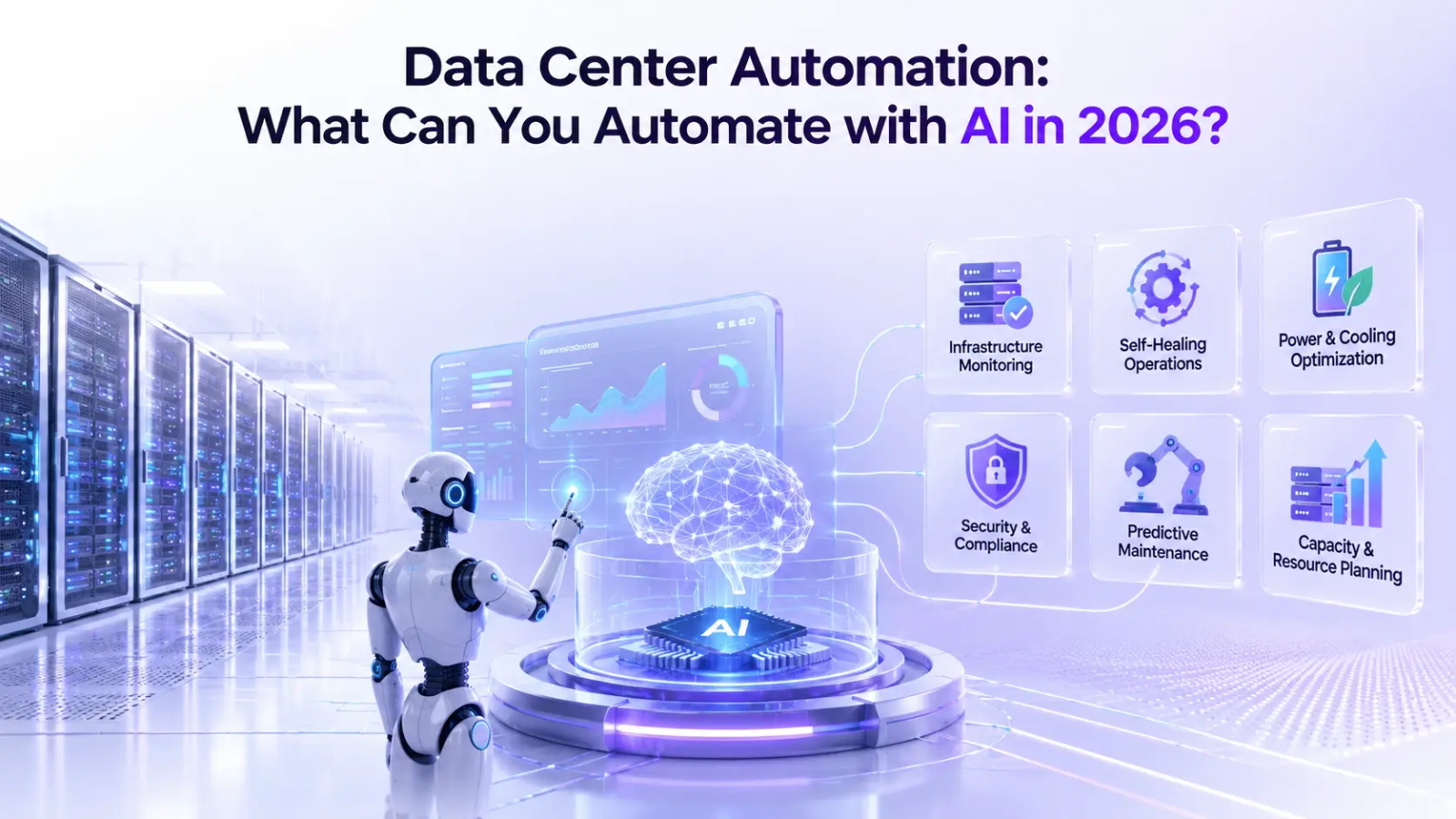
At 3 a.m., a failed service, a full disk or a network alert can turn a routine shift into a long troubleshooting session. When the same operational tasks appear repeatedly, data center automation becomes a practical way to handle them. Otherwise, manual runbooks create unnecessary work and leave more room for human error.
The market is already reflecting the shift toward automated operations. Mordor Intelligence estimates that the global data center automation market will reach $12.32 billion in 2026, up from $10.48 billion in 2025, and projects it to reach $27.64 billion by 2031.
The question, then, is not simply whether you should automate. It is what tasks can be automated in a data center, how those workflows should be connected, and where engineers still need to make the call. This guide breaks down the data center automation stack, explains how the workflows operate, identifies the technologies involved and shows where automation should stop.
What Is Data Center Automation?
Data center automation is a process of using software, APIs, policies, and orchestration platforms to execute infrastructure tasks with limited manual involvement. It helps data center teams standardize routine operations, reduce repetitive work, and respond to infrastructure events faster. Rather than a single tool, it is a set of capabilities that span three layers, each covering a different scope of work.
Task Automation
Task automation handles individual actions:
- Start or restart servers
- Apply configurations
- Run health checks
- Create tickets
Workflow Automation
Data center workflow automation chains several tasks into a defined sequence, so one trigger carries a job through multiple steps:
- Provision, configure, validate, monitor
- Detect alert, investigate, remediate, document
- Patch, test, deploy, verify, rollback
Orchestration
Data center orchestration sits above both layers, coordinating multiple systems and tools at once through workflow orchestration. A single new VM request, for example, can trigger compute allocation, network configuration, storage provisioning, security policies, and monitoring registration, all in one pass.
The Data Center Automation Spectrum: A Quick Framework
Most teams see automation as all or nothing: either the system handles the work, or a person does. In practice, workflows sit on a spectrum. Some run fully automatically, while others need human input at specific points. The key is knowing where each workflow fits and automating accordingly.
Before automating a workflow, classify the decision involved.
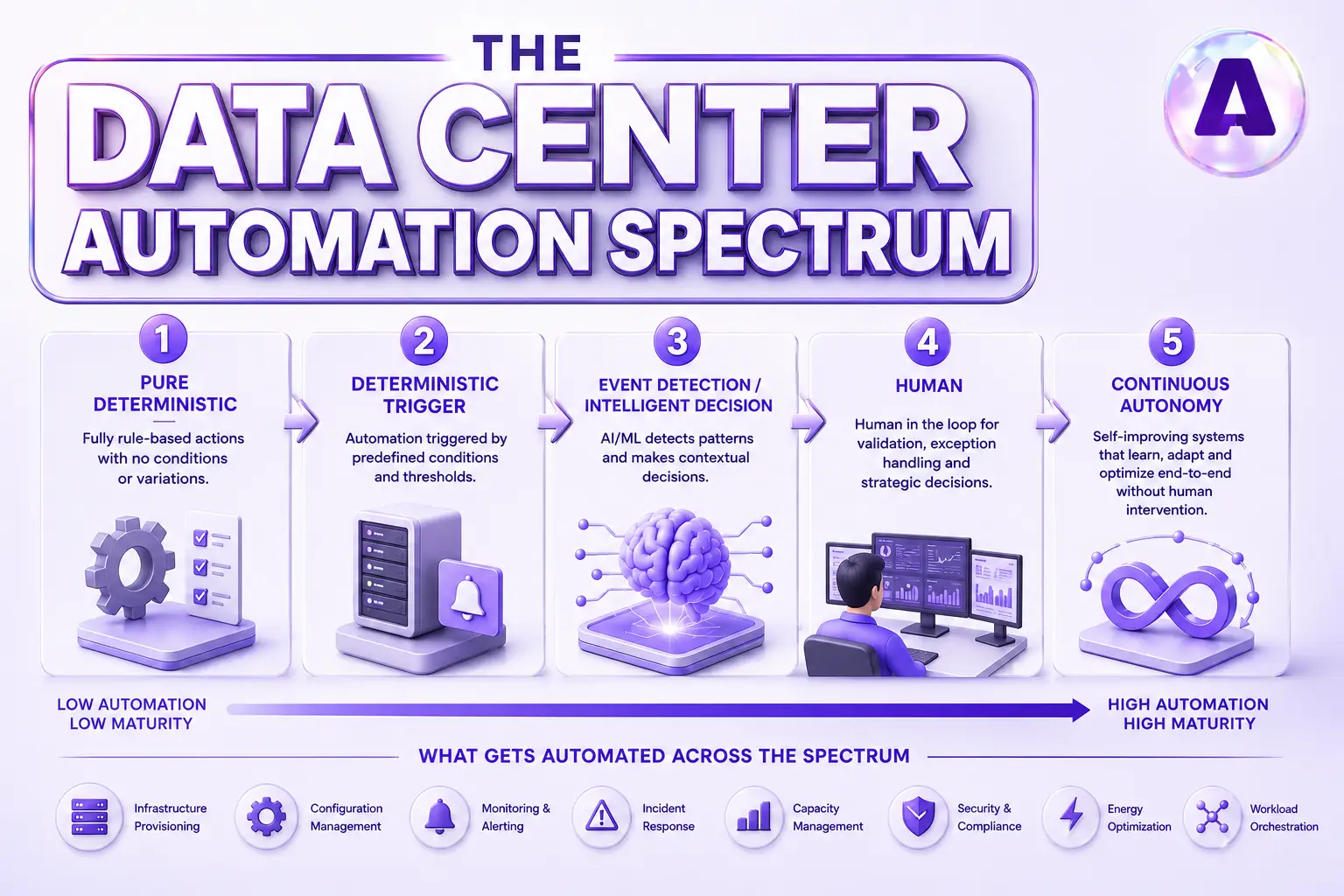
Pure Deterministic Automation
This is the most predictable level of automation. The trigger, conditions and action are clearly defined, so traditional rules, scripts and orchestration tools can execute the workflow without human intervention.
Consider an example:
If a provisioning request meets predefined CPU, memory, network and security requirements, automatically deploy the appropriate server or VM template. If the request does not meet those conditions, route it for review.
There is little value in adding complex decision-making to workflows that already have clear rules. For these tasks, continue using scripts, configuration-management tools, IaC platforms, or existing automation software. If deterministic automation works reliably, there is no need to make it more complicated.
2. Deterministic Trigger + Automated Execution
Here, the system can reliably identify when an action is required, but the workflow involves several steps across different infrastructure systems. An orchestration layer connects those steps and executes them in sequence.
Consider a scenario where a monitoring platform may detect that a server has failed a health check. That event can trigger a runbook that checks dependencies, restarts a service, validates system health and updates the incident ticket.
This is where runbook automation, API-driven automation and data center orchestration deliver significant value.
3. Event Detection + Intelligent Decision + Execution
Some infrastructure events cannot be handled effectively with a fixed set of if/then rules. The automation needs to interpret multiple signals before deciding what action is appropriate.
For example, an automation system could correlate CPU pressure, memory utilization, application latency and workload placement before recommending or initiating workload movement. AI-assisted remediation can help analyze these signals and identify the most appropriate response.
This level requires stronger guardrails, observability and validation because the system has more discretion over both the decision and the action.
4. Human + Automation Collaboration
High-impact infrastructure decisions should often remain collaborative. Automation can gather telemetry, correlate incidents, analyze historical patterns, recommend remediation and prepare a change plan, while an engineer makes the final decision. This model is useful for major production changes, unusual hardware failures, security incidents with a large blast radius.
Consider a scenario where an automation system can correlate monitoring alerts, recent configuration changes, system logs and historical incidents, then suggest the most likely cause and recommend a remediation step. An engineer reviews the evidence and decides whether to proceed.
Use this approach for high-value operational workflows where engineers spend significant time gathering and analyzing information, but expert judgment is still required before taking action.
What Can Be Automated in a Data Center?
The most useful approach is to examine automation task by task. Each workflow has different triggers, tools, controls and opportunities for human intervention.
Server and VM Provisioning
Provisioning is usually the first target for data center infrastructure automation, and for good reason: it’s repetitive, well-defined, and easy to template. Zero-touch provisioning and PXE boot let a bare-metal server pull its OS, drivers, and baseline config the moment it powers on, with no technician typing commands at a console. Golden images standardize what “ready” looks like, so every new build starts from the same known state.
Infrastructure as code takes this further. Tools like Terraform, Ansible, and Pulumi turn a server or VM request into a version-controlled file instead of a manual build sheet. VM provisioning automation tied to vCenter or cloud APIs lets a request from a service catalog trigger the whole build without a ticket sitting in someone’s queue. Foreman and Cobbler handle the bare-metal side, while Kubernetes operators extend the same pattern to physical nodes backing containerized workloads.
Configuration Management and Drift Control
Once a system exists, keeping it in its intended state is its own ongoing job. Configuration management tools, such as Ansible, Puppet, Chef, and SaltStack, enforce a baseline and re-apply it automatically when something drifts. Configuration drift, where a server slowly diverges from policy through one-off manual fixes, is exactly the kind of slow-burn problem automation catches before it becomes an audit finding.
Firmware and BIOS settings fall into this category too. BIOS/BMC firmware automation, run through Redfish APIs or vendor tooling like iDRAC and iLO, keeps hardware settings consistent across a fleet without a technician touching every chassis. This ties directly into compliance automation, since CIS benchmarks depend on configurations staying exactly where policy says they should.
Network Automation
Network changes used to mean a person logging into a switch CLI, one device at a time, hoping nothing went wrong. Network configuration automation replaces that with templated pushes across an entire fabric. Ansible and NAPALM handle vendor-agnostic config changes, while platforms like Cisco DNA Center layer in intent-based networking, where you describe the desired state and the platform works out the device-level commands.
VLAN provisioning, ACL updates, and routine switch changes are now largely scriptable. API-driven automation ties this layer to everything else: the same trigger that provisions a server can also request its network port configuration, so both steps happen together instead of across two separate teams.
Patch and Firmware Management
Patch orchestration is where automation earns its keep on risk reduction, not just speed. Staged deployment, sometimes called ring-based rollout, pushes a patch to a small canary group first, checks health, then expands to wider rings only if nothing broke. Automated rollback reverses a patch the moment a health check fails, instead of waiting for someone to notice degraded performance hours later.
Tools like Red Hat Satellite, SCCM, and WSUS handle OS-level patch scheduling, while dedicated firmware lifecycle tools manage the driver and BIOS side. Automated health checks between each ring are what make this safe: without them, staged deployment is just automation with the same blast radius, spread over a longer window.
Monitoring, Alerting, and Capacity Management
Infrastructure monitoring platforms, including Prometheus, Zabbix, Datadog, and SolarWinds, collect the telemetry every other automation in this list depends on. DCIM automation extends that visibility to the physical layer: power draw, cooling performance, rack space, and environmental conditions across the floor.
Raw alerts on their own create noise, so automated alerting systems correlate and deduplicate events before a human ever sees them, cutting a hundred related pages down to one actionable ticket. Capacity management builds on the same data, using trend analysis to trigger scaling actions or procurement requests before a resource actually runs out, rather than after.
Incident Response and Remediation
This is where data center workflow automation ties everything together into something closer to a full pipeline. Automated ticketing connects monitoring platforms to ServiceNow or PagerDuty, so a detected fault becomes a tracked ticket without manual entry. Runbook automation takes it further, codifying the steps an engineer used to follow by hand into automated runbooks that execute the same sequence consistently, every time.
Automated remediation handles the routine fixes directly: restarting a hung service, triggering a failover, or scaling out a pool that’s under load. AI-assisted remediation adds a layer on top, using anomaly detection to flag unusual patterns and either suggest a fix or apply one within pre-approved limits. Self-healing infrastructure, where systems detect and resolve their own faults with no ticket at all, is the aspirational tier most teams are still building toward.
How Data Center Workflow Automation Gets Orchestrated
Individual automations become more useful when they are connected into an end-to-end workflow. This is the role of the data center orchestration layer.
Consider a simple event-driven workflow: a health check fails, monitoring generates an alert, the event creates a ticket, an automated runbook starts remediation, another health check verifies the result and the ticket closes if the service recovers.
Platforms such as StackStorm, Rundeck, ServiceNow Orchestration, Ansible AWX and n8n can coordinate these actions. APIs connect compute, networking, storage, monitoring, DCIM and ticketing systems.
This approach turns separate scripts into a controlled operational process. Each action can have defined triggers, permissions, validation steps, rollback procedures and audit records.
Data Center Automation Tools and Technologies
The right data center automation tools depend on the job you need to automate. Rather than selecting software from a generic list, map each platform to a specific operational function.
Infrastructure as Code
IaC tools handle repeatable infrastructure deployment, version-controlled configurations, and standardized environments across a fleet. Terraform, Ansible, and Pulumi are the common choices here, each targeting a slightly different mix of cloud and on-prem resources.
Configuration Management
This category covers OS configuration, package management, and desired-state enforcement. So, systems stay aligned with policy after they’re built. Ansible, Puppet, and Chef are the standard tools, differing mainly in agent-based versus agentless design.
Data Center Infrastructure Management
DCIM automation software tracks asset inventory, power draw, cooling capacity, and floor space. This gives operations teams a live picture of the physical environment behind every virtual workload.
Monitoring and ITSM Platforms
Monitoring, alerting, ITSM, and CMDB systems need to talk to each other for runbook automation to work at all. When a monitoring platform can open a ticket and a CMDB can confirm which systems are affected, an automated response has the context it needs to act correctly.
APIs and Orchestration Platforms
APIs are the connective tissue linking compute, network, storage, security, monitoring, and ticketing into one system instead of six separate ones. Orchestration platforms sit on top, calling those APIs in sequence to execute a full workflow rather than a single isolated task.
What Should NOT Be Automated (Yet)
Automation handles repeatable, well-understood work. It struggles with situations nobody has scripted yet.
- Novel incident triage that requires correlating symptoms across unrelated systems still needs an engineer who can reason across the whole environment, not just one alert.
- Capacity and architecture decisions carry business trade-offs, including cost, risk tolerance, and growth projections, that a script cannot weigh on its own.
- Security incidents need forensic judgment before any remediation runs, since an automated fix can destroy evidence a security team needs later.
- Physical hardware failures still need hands-on-glass work, and change approvals with compliance or regulatory weight need a person accountable for the decision, not just a log entry.
Automation handles the “how.” People still own the “whether.”
How Much of Data Center Operations Can Actually Be Automated?
There is no universal percentage for how much data center operations can be automated. The practical answer depends on infrastructure standardization, tooling, APIs, observability, and the maturity of existing workflows.
- Routine, repeatable tasks can often reach a high level of automation.
- Provisioning, health checks, patch deployment, configuration enforcement and known remediation actions are natural starting points.
- Judgment-heavy work remains partly manual.
Most enterprises operate somewhere between manual procedures and highly automated environments, while selected workloads may approach a lights-out model.
How Aptly Technology Supports Data Center Operations Automation
Most enterprises already have automation tools. The harder part is connecting those tools into reliable workflows and ensuring the underlying infrastructure is stable enough to support them.
Aptly Technology works across the infrastructure stack, including:
- AI workload deployment and optimization
- Enterprise IT infrastructure services
- AI observability and monitoring
- High-speed InfiniBand networking
- Infrastructure orchestration
What Does AI Do in Aptly’s Data Center Operations Services?
Aptly uses AI and automation across the incident lifecycle not only for monitoring. Our Data Center Operations service combines intelligent monitoring, workflow automation, and 24×7 engineering support to:
- Detect anomalies and correlate alerts across servers, networks, storage, power, cooling, and management platforms.
- Diagnose probable root causes using telemetry, event history, topology, and known operational patterns.
- Recommend remediation actions based on approved runbooks and prior incidents.
- Automatically execute low-risk, repeatable actions when pre-authorized by the customer.
- Verify recovery through health checks, telemetry validation, and continued monitoring.
- Escalate unresolved or high-risk incidents to Aptly engineers with the relevant diagnostics and recommended next steps
What Does Auto-Remediation Mean for Aptly?
Auto-remediation is the automated execution of a customer-approved runbook within defined security controls, thresholds, and rollback procedures.
Examples may include:
- Restarting a failed monitoring agent or approved service, followed by a health check.
- Clearing temporary files or rotating logs when disk utilization exceeds an approved threshold.
- Reapplying an approved configuration or resetting a non-responsive management interface when a known configuration drift or transient fault is detected.
Human approval and monitoring are required when an action could affect production workloads, create downtime, modify security or network policies, change firmware or BIOS/UEFI settings, replace hardware, or fall outside the approved automation scope.
Where Automation Stops and Human Operations Begin
AI/automation only covers less than 40% of total incidents, the ticket that are applied with auto-recover are highly repetitive, with cleat troubleshooting steps, and measurable results.
An incident is escalated to Aptly’s 24×7 engineers when:
- Automated remediation fails or the issue recurs.
- The root cause cannot be determined with sufficient confidence.
- Multiple systems or services are affected.
- A security event, hardware failure, capacity risk, or potential service outage is detected.
- The required action is not covered by an approved runbook.
- A customer-defined approval threshold is reached.
Aptly engineers retain control of high-impact decisions, including production changes, emergency change authorization, physical intervention, hardware replacement, security containment, firmware updates, and coordination with customers or third-party vendors. All automated and human actions are logged and auditable.
The customer determines which remediation workflows may run automatically, which require approval, and which must always remain human-controlled.
The Practical Goal of Data Center Automation
The objective is not to automate every data center task. It is to automate the right tasks within clearly defined operational boundaries. A reliable automation model combines stable infrastructure, observable systems, well-defined runbooks, controlled remediation, and human oversight where the risk requires it.
If you’re evaluating where your infrastructure stands on that maturity curve, Aptly can help assess automation readiness and design the operating model to get there.
Data Center Automation Best Practices for Getting Started
A few practices separate teams that automate safely from teams that automate their way into a bigger outage.
- Start with low-risk, high-frequency tasks like provisioning and patching before touching incident response.
- Build observability first: you cannot safely automate remediation for a system you cannot see clearly.
- Version-control runbooks the same way you version-control code, with review and change history.
- Keep rollback paths and audit trails on every automated action, no exceptions.
Working through tasks in that order keeps the blast radius small while your team builds confidence in the system.
Conclusion
Data center automation is not an all-or-nothing decision. It’s a spectrum running from server provisioning at one end to self-healing remediation at the other. The right tools, applied with the right boundaries, turn routine operational work into something your team barely has to think about, while judgment-heavy decisions stay exactly where they belong: with people.
If you’re ready to move up the automation spectrum, Aptly Technology can help.
FAQs
Q1: What can be automated in a data center?
Provisioning, configuration management, network changes, patching, monitoring, ticketing, capacity management, and routine incident remediation can all run through automated workflows with the right tools in place.
Q2: What tasks can be automated in a data center?
Specific examples include server and VM provisioning, network configuration pushes, automated health checks, staged patch deployment, and routine service restarts or failovers triggered by monitoring alerts.
Q3: How do you automate data center operations?
Combine infrastructure as code, configuration management, and network automation for the build layer, then connect monitoring, ticketing, and orchestration tools through APIs so alerts trigger automated runbooks.
Q4: What tools are used for data center automation?
Common categories include IaC platforms like Terraform and Ansible, configuration management tools like Puppet and Chef, DCIM software, monitoring and ITSM platforms, and orchestration tools like StackStorm or Rundeck.
Q5: Can data center automation support AI infrastructure?
Yes. It extends to GPU cluster provisioning, workload scheduling, utilization monitoring, and automated remediation for AI workloads, following the same patterns used for traditional compute.
Q6: What should not be automated in a data center?
Novel incident triage, capacity and architecture decisions with business trade-offs, security incidents requiring forensic review, hands-on hardware repair, and compliance-sensitive.
Table of content
- TL;DR
- Introduction
- What Is Data Center Automation?
- The Data Center Automation Spectrum: A Quick Framework
- What Can Be Automated in a Data Center?
- How Data Center Workflow Automation Gets Orchestrated
- Data Center Automation Tools and Technologies
- What Should NOT Be Automated (Yet)
- How Much of Data Center Operations Can Actually Be Automated?
- How Aptly Technology Supports Data Center Operations Automation
- Data Center Automation Best Practices for Getting Started
- Conclusion
- FAQs