Introduction: Why AI Data Center Rack Design Now Drives Infrastructure Strategy
A rack used to hold servers. In an AI data center, the rack is the system. NVIDIA’s GB200 NVL72 ties 72 Blackwell GPUs and 36 Grace CPUs into one liquid-cooled, rack-scale design (NVIDIA), and Uptime Institute rates the rack at 132 kW (Uptime Institute). Few facilities were built for this load. AI data center rack design now decides whether a GPU purchase becomes working capacity or an expensive wait for power and cooling.
This guide follows AI data center rack design in five phases, from workload to go-live. You will see how high-density GPU racks differ from enterprise racks, how to calculate GPU rack power requirements, how to match cooling to density, and how to plan GPU rack networking.
Where AI Data Center Rack Design Planning Starts: A Five-Phase Roadmap
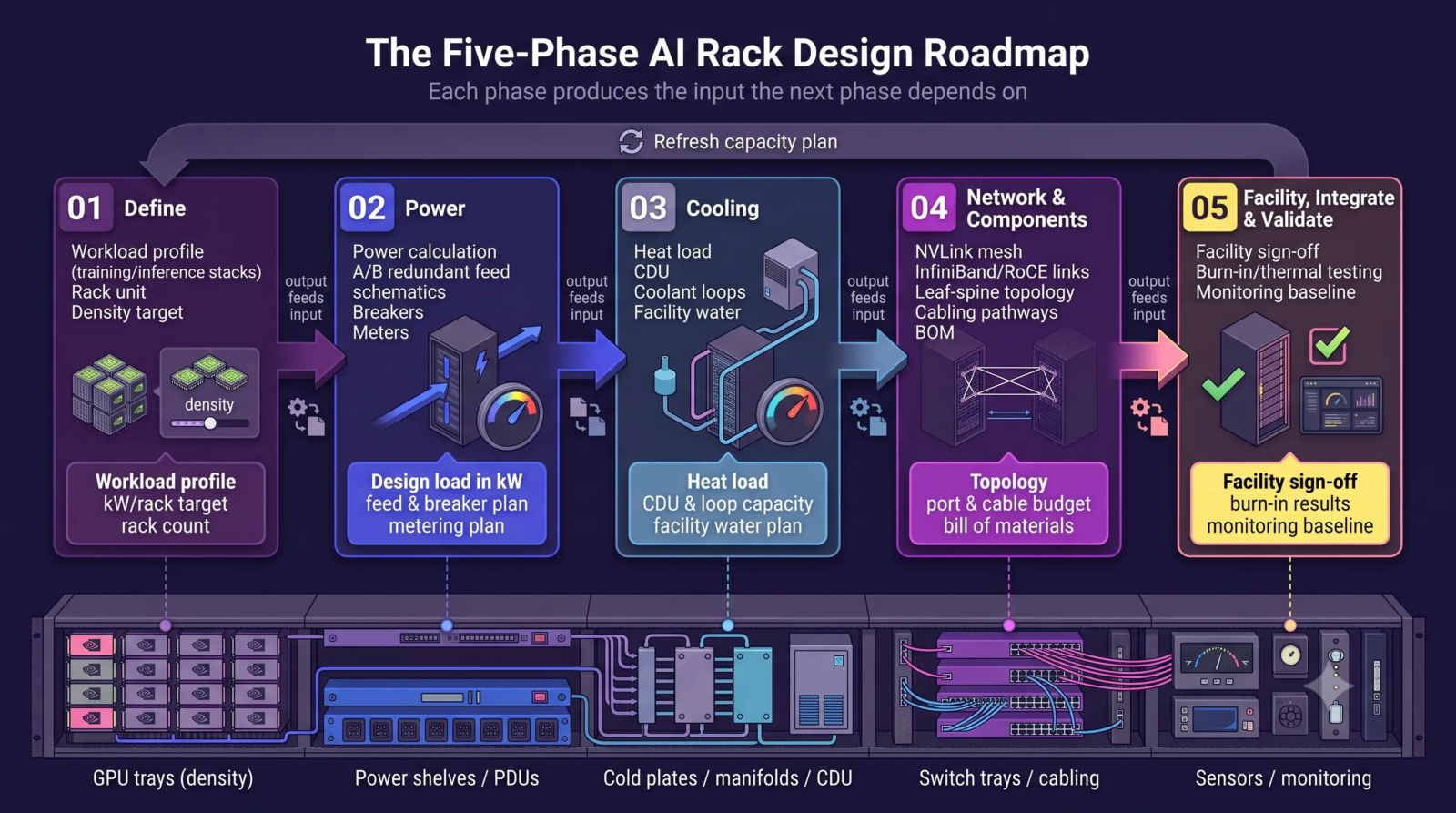
Planning starts in Phase 1 with two inputs: the workload you will run and the power and cooling your site will deliver. Choose no rack model before you have both. How do you design a high-density GPU rack? Work through the five phases in order. Each phase produces an output which feeds the next, so skipping ahead creates rework in AI infrastructure design.
| Phase | Focus | Output |
|---|---|---|
| 1. Define | Workload, rack unit, and density target | Workload profile, kW per rack target, rack count |
| 2. Power | Power calculation, redundancy, and distribution | Design load in kW, feed and breaker plan, metering plan |
| 3. Cooling | Air, rear-door, or direct-to-chip cooling | Heat load, CDU and loop capacity, facility water plan |
| 4. Network & Components | Fabric, topology, cabling, and rack parts | Topology, port and cable budget, bill of materials |
| 5. Facility, integrate, validate | Readiness checks, burn-in, and operations | Facility sign-off, burn-in results, monitoring baseline |
Phase 1: Define the Workload and AI Data Center Rack Design Requirements
How High-Density GPU Racks Differ From Conventional Enterprise Racks
A conventional rack holds independent servers on AC feeds and exhausts heat into a shared aisle. High-density GPU racks behave like one machine. GPUs exchange data constantly during training, so designers pack them close together and wire them with short, fast links. The GB200 NVL72 shows the pattern: 72 GPUs form a single NVLink domain with 130 TB/s of switch bandwidth (NVIDIA).
Density follows latency. Uptime Institute explains tight coupling cuts hops and distance, which improves performance, but heavy densification adds cost in hardware and facility upgrades (Uptime Institute). Rack-scale architecture also changes what you buy. The unit is no longer a server. The unit is a rack with compute trays, switch trays, power shelves, and liquid manifolds, commissioned as one system. This shift defines modern AI server rack design, and AI data center rack design starts from this shift.
GPU Rack Power Density Explained
What is GPU rack power density? The term means the electrical load a rack draws, measured in kilowatts per rack. Uptime Institute’s 2024 survey found only about 1 percent of operators run racks above 100 kW, so a 132 kW rack sits far outside the experience of most facility teams (Uptime Institute). High-density data center racks strain every assumption behind air-cooled halls: feed size, heat removal, and floor load.
Workload type shifts the target. Training holds large GPU groups at high load for long periods and drives constant all-to-all traffic. Inference racks often run at lower sustained density and need less fabric bandwidth between racks. Pick the dominant profile before AI data center rack design locks in rack density.
Seven Requirements for GPU Rack Design
AI data center rack design requirements fall into seven areas. GPU rack design succeeds when each area has a confirmed number, not a preference.
- Compute density. Choose GPUs per rack by what the building supports. Uptime Institute compares 132 kW rack-scale systems, 64-GPU racks at 80 to 90 kW, and four-server racks under 50 kW (Uptime Institute).
- Feeds, redundancy, and headroom for peak draw (Phase 2).
- Heat load, loop capacity, and facility water supply (Phase 3).
- Switch ports, optics, and cable pathways per rack (Phase 4).
- Weight and floor loading. A GB200 NVL72-class rack weighs about 1.4 metric tons (Uptime Institute). Check point loads, ramps, and elevator ratings, not only the average slab rating.
- Technicians need front and rear access, safe liquid connections, and cable management which leaves service paths clear.
- Leave space and capacity for the next generation. NVIDIA expects 800 VDC distribution to arrive with its Kyber racks in 2027 (NVIDIA).
Phase 1 output: a workload profile, a target kW per rack, and a rack count.
Phase 2: Design GPU Rack Power Requirements and Power Distribution
Calculating GPU Rack Power Requirements
How much power does a GPU rack require? Build the number from components, because power drives AI data center rack design more than any other input. For each server, add GPU TDP, CPUs, memory, storage, NICs, fans, and conversion losses. Add switches and rack overhead, then add headroom. The table shows a worked example for an eight-GPU server using assumed values, not vendor ratings.
| Component | Assumed Load |
|---|---|
| GPUs (8 at 1.0 kW each) | 8.0 kW |
| CPUs | 0.7 kW |
| Memory and storage | 0.6 kW |
| NICs | 0.4 kW |
| Fans and Conversion losses | 1.3 kW |
| One Server | 11.0 kW |
| Four servers plus switches and overhead (1.0 kW) | 45.0 kW |
| Design load with 20 percent headroom | 54.0 kW |
Nameplate and workload power differ. Real draw follows the job and spikes in short bursts. HPE lists a 132 kW nominal rating and an electrical design peak near 192 kW for a GB200 NVL72 rack (HPE), a 1.5x spread. Size breakers, busways, and upstream capacity for the peak, then meter real draw during burn-in.
Rack power requirements include redundancy and maintenance, not only capacity. A and B feeds should each carry the full rack load, so one side fails or goes offline for service while jobs keep running. Concurrent maintainability holds only when the spare path has real headroom, so AI data center rack design must budget this spare capacity.
Power Distribution in High-Density GPU Racks
How should power be distributed in a high-density GPU rack? Start with voltage and phase. Three-phase feeds carry more power per conductor and suit dense racks. At 415 V three-phase, the 54 kW design load above draws roughly 75 to 80 amps. Continuous-load derating pushes the feed toward a 100-amp class circuit. Uptime Institute shows the low end of the range: a 22 kW rack on a 400 V, 32 A circuit, with power capping holding the load inside the breaker (Uptime Institute).
Inside the rack, two patterns dominate. A rack power distribution unit (PDU) delivers AC to each server’s power supplies, which suits eight-GPU servers at moderate density. Open Rack v3 centralizes AC-to-DC conversion in power shelves and delivers 48 V DC over a vertical busbar, which removes per-server cords (Open Compute Project). Rack-scale systems follow the shelf-and-busbar model: HPE’s GB300 NVL72 rack carries eight 33 kW power shelves (HPE).
Busbars have a ceiling. NVIDIA says 54 V DC distribution reaches physical limits as racks exceed 200 kW, and a 1 MW rack at 54 V needs up to 200 kg of copper busbar (NVIDIA). Plan metering at each PDU outlet or power shelf, and ask vendors which distribution voltage their next generation expects before you finalize AI data center rack design.
Phase 2 output: a design load in kW, A and B feed sizes, and a metering plan.
Phase 3: Design GPU Rack Cooling Requirements and Liquid Cooling for GPU Racks
GPU Rack Cooling Capacity and Heat Load
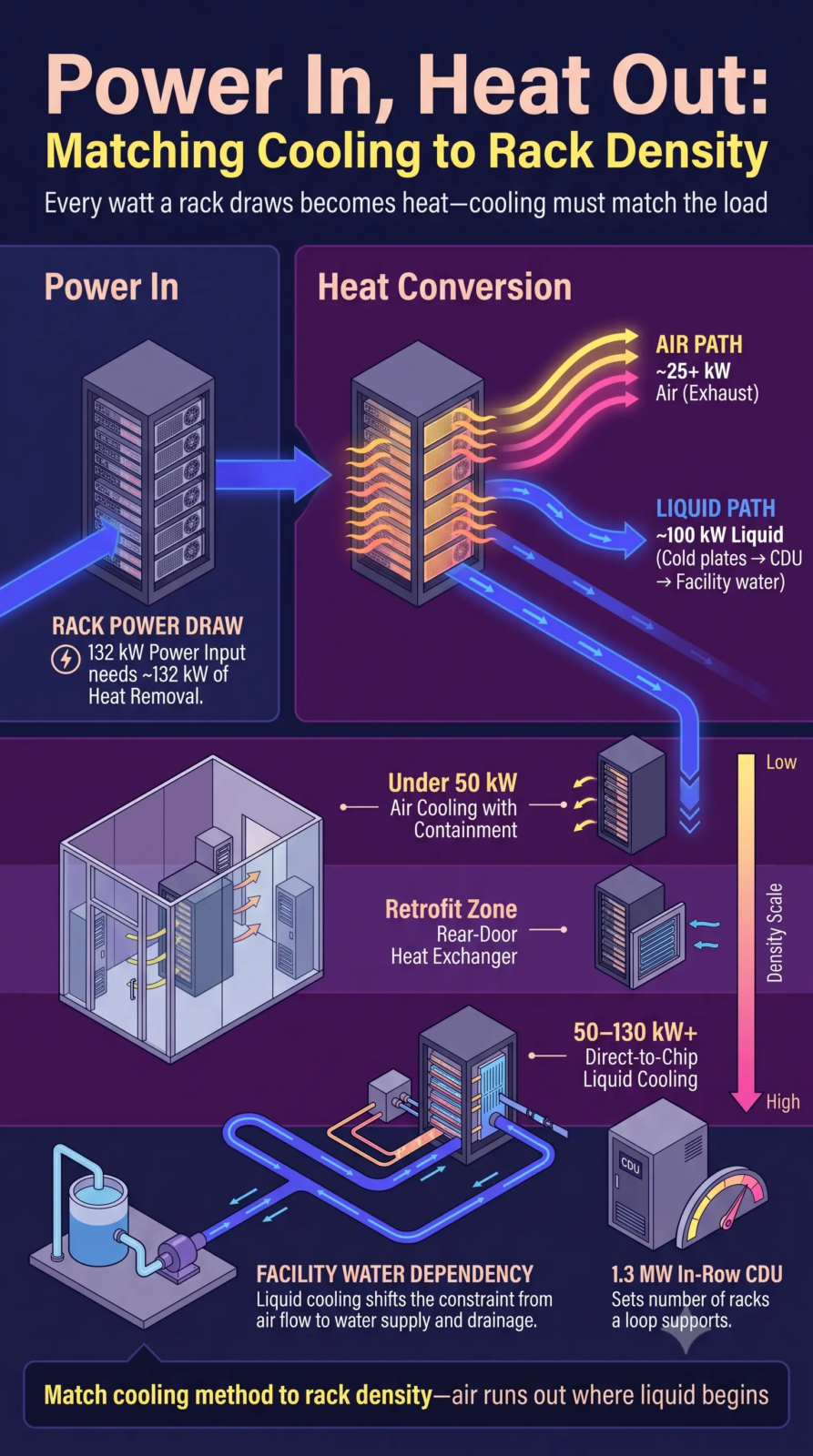
How much cooling does a GPU rack need? Every watt a rack draws becomes heat, so cooling capacity must match the electrical load. A 132 kW rack needs about 132 kW of heat removal. Uptime Institute reports cold plates in the NVL72 handle around 100 kW of thermal power while air exhaust exceeds 25 kW, so you plan for both loops (Uptime Institute). GPU rack cooling requirements therefore include liquid capacity, residual air capacity, and facility water supply. AI data center power and cooling plans must match line by line, and GPU rack power and cooling design should be one workstream with one owner.
Liquid Cooling for GPU Racks: Why Air Runs Out
Why do high-density GPU racks require liquid cooling? Air runs out of headroom first. Uptime Institute notes air cooling becomes technically viable at under 50 kW per rack with good airflow management, and fan power then reaches up to 10 percent of full load (Uptime Institute). NVIDIA describes the GB200 NVL72 as liquid-cooled and says liquid cooling increases compute density and reduces floor space (NVIDIA). Uptime states the NVL72 mandates direct liquid cooling.
Air, Rear-Door Heat Exchanger, and Direct-to-Chip Cooling Compared
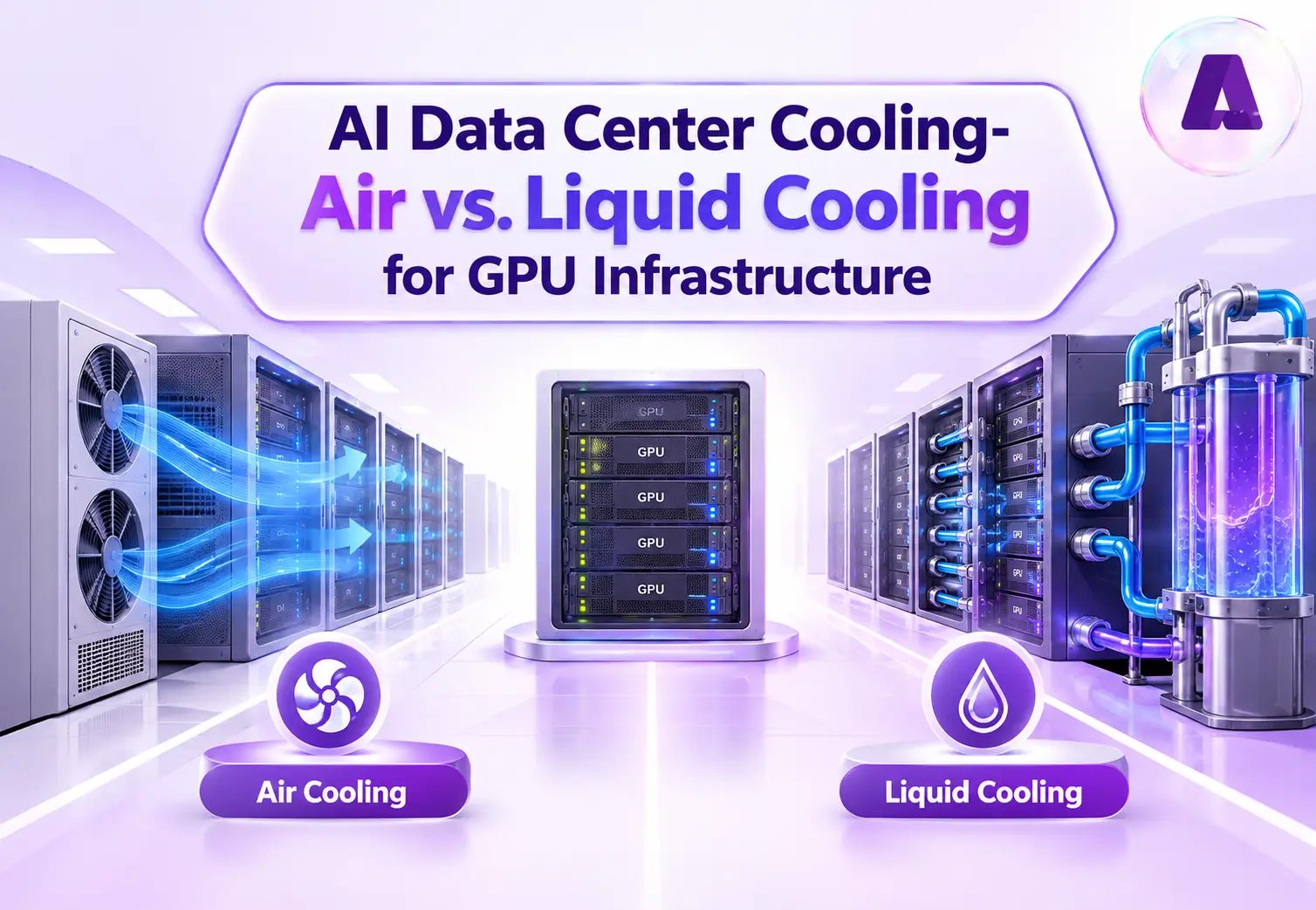
Three approaches cover the range in AI data center rack design. Air cooling with containment fits lower densities. A rear-door heat exchanger replaces the rack’s rear door with a water-cooled coil, which captures heat at the door and stretches air-cooled halls to higher densities. Direct-to-chip cooling mounts cold plates on GPUs and CPUs. A secondary coolant loop carries heat to a coolant distribution unit (CDU), a liquid-to-liquid heat exchanger which passes heat to the facility’s primary loop (HPE).
CDU sizing sets how many racks a loop supports. Vertiv’s CoolChip CDU family spans 70 kW to 2,300 kW, and HPE lists a 1.3 MW in-row CDU for GB200 NVL72 racks (Vertiv, HPE). Liquid cooling for GPU racks also needs manifolds, leak detection, and facility water capacity, and all three belong in AI data center rack design from the start. Aptly’s guide to air versus liquid cooling for GPU infrastructure goes deeper on each option.
| Approach | Rack Density Suitability | Cooling Approach | Facility Requirements | Best-fit Use Cases |
|---|---|---|---|---|
| Air cooling with containment | Lower density, under about 50 kW | Room air through contained aisles, CRAH or in-row coolers | Airflow management, chilled water or DX | Eight-GPU servers, inference, existing halls |
| Rear-door heat exchanger | Moderate density, extends air-cooled halls | Water-cooled coil on the rear door, plus room air | Chilled water to each rack, door weight, facility loop | Retrofits needing more density |
| Direct-to-chip Liquid Cooling | High density, roughly 50 kW to 130 kW and above | Cold plates on GPUs and CPUs, CDU, secondary loop | CDUs, facility water, manifolds, leak detection, floor loading | Rack-scale training and large-model inference |
Phase 3 output: a heat load, a cooling method, CDU and loop capacity, and a facility water plan.
Phase 4: Plan GPU Rack Networking, GPU Cluster Design, and Rack Components
GPU Rack Networking: Scale-Up and Scale-Out Fabrics
What networking does a GPU cluster need? Two fabrics plus management.
- Plan for both fabrics: AI data center rack design must reserve ports and pathways for each.
- Scale-up fabric: connects GPUs inside a rack-scale system.
- NVLink: fifth-generation NVLink provides 1.8 TB/s of GPU-to-GPU bandwidth, and the NVLink Switch System links the 72 GPUs in a GB200 NVL72 at 130 TB/s (NVIDIA).
- Scale-out fabric: connects racks. NVIDIA pairs the NVL72 with Quantum-X800 InfiniBand, Spectrum-X800 Ethernet, and BlueField-3 DPUs (NVIDIA).
InfiniBand and RoCE:
- Shared role: both carry RDMA traffic.
- InfiniBand: a purpose-built fabric.
- RoCE: runs RDMA over Ethernet and fits teams standardized on Ethernet operations.
- Real-world proof: Meta built two clusters of roughly 24,000 GPUs, one on RoCE and one on NVIDIA Quantum-2 InfiniBand, and reports running large GenAI jobs on both without network bottlenecks (Meta).
- Decision rule: settle AI data center rack design around operations skills, vendor support, and scale, not around a universal winner.
Plan east-west traffic first:
- Topology: training sends heavy traffic between GPUs, so design a leaf-spine topology with enough uplinks to limit oversubscription.
- Budget per rack: GPU rack networking also means planning switch ports, optics, and cable pathways for every rack.
- Latency and tail behavior: these matter as much as peak bandwidth. Meta notes one problem GPU stalls an entire training job and grows hard to find at scale (Meta).
- Cabling and layout: good GPU cluster design and GPU cluster infrastructure choices meet in AI data center rack design, because unplanned cable bundles block airflow and service paths.
AI Server Rack Design: The Main Components of an AI GPU Rack
What are the main components of an AI GPU rack? AI data center rack design assembles these parts into one rack-scale system:
- GPU servers or compute trays. GPUs, CPUs, memory, and local storage.
- Network switches and NICs. Switch trays for the NVLink domain, plus top-of-rack switches for the cluster fabric.
- Power shelves and PDUs. Convert and meter power for every tray.
- Carry DC power vertically through the rack in Open Rack v3 and rack-scale designs.
- Copper inside the rack, optical between racks, routed to protect airflow and service access.
- Cooling hardware. Cold plates, manifolds, hoses, and the CDU connection.
- Temperature, flow, pressure, and leak detection.
- Monitoring software. Telemetry and orchestration, such as NVIDIA Mission Control for Grace Blackwell data centers (NVIDIA).
Phase 4 output: a fabric topology, a port and cable budget, and a bill of materials for each rack.
Phase 5: Confirm Facility Readiness and Complete GPU Rack Integration
AI Data Center Power and Cooling Readiness Checks
Facility readiness decides whether the numbers from Phases 1 to 4 hold, so AI data center rack design and facility review run together. Confirm electrical capacity, mechanical capacity, water supply, drainage, floor space, and the floor loading of rack-scale systems before hardware orders. Aptly’s guide to AI data center site selection covers how to evaluate power, fiber, land, and cooling availability.
Validation, Burn-In, and Operations After GPU Rack Integration
Validate in layers. Test each rack alone first: power-on, thermal load, leak checks, and link tests. Then test the cluster fabric and run real jobs. Meta notes network cable problems appear most often early in a server’s life (Meta), so burn-in catches faults before production jobs do. After go-live, track rack power, coolant temperature, and GPU utilization against your design numbers, and refresh the capacity plan as hardware changes.
Phase 5 output: facility sign-off, burn-in results, and a monitoring baseline.
Common AI Data Center Rack Design Mistakes and How to Avoid Them
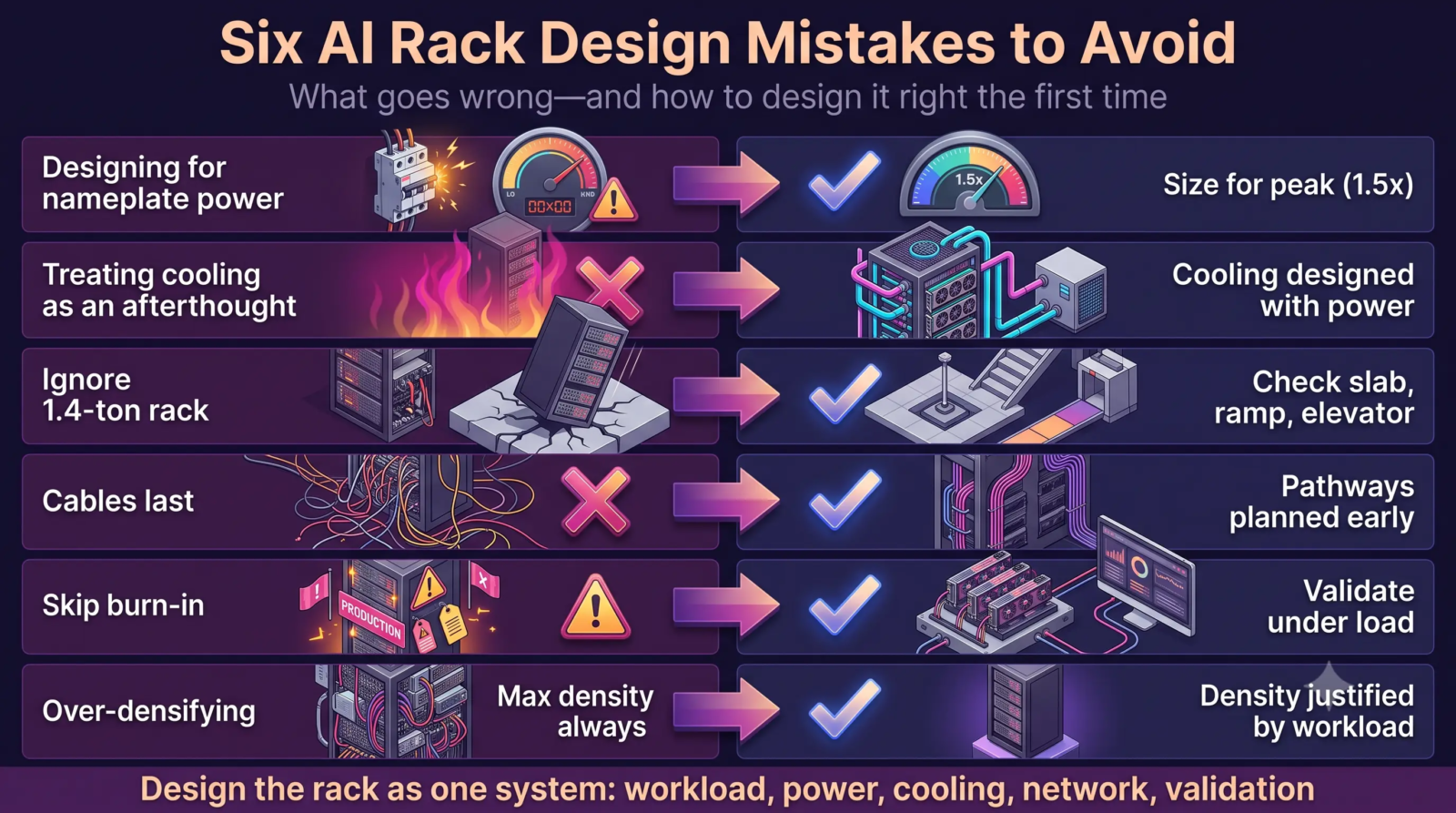
Six mistakes are worth avoiding in AI data center rack design:
- Designing for nameplate power: Size for peak, which reaches about 1.5 times nominal in HPE’s listing.
- Treating cooling as an afterthought: Heat load and CDU capacity set how many racks you deploy.
- Ignoring weight and logistics: A 1.4-metric-ton rack stresses slabs, ramps, and elevators. Check the path from dock to final position.
- Leaving cabling to the end: Late cable routing blocks airflow and service access. Plan pathways with the rack layout.
- Skipping validation: Burn-in catches early-life cable and hardware faults before production jobs do.
- Over-densifying: Lower-power GPUs keep racks under 20 kW, which suits many existing facilities without major upgrades (Uptime Institute). Higher density adds cost, so buy density only when the workload justifies the cost.
How Aptly Technology Supports AI Data Center Rack Design and GPU Rack Integration
Aptly Technology is authorized to build and support third-party hyperscale data centers worldwide. For AI data center rack design, Aptly’s AI data center buildout and support services cover GPU rack integration, power and cooling validation, rack energization, and cluster validation. Aptly delivers GPU-dense racks which are burn-in tested, benchmarked, and wired for high-throughput fabrics, and works with NVIDIA and Supermicro on GPU infrastructure.
After go-live, Aptly’s AI infrastructure managed services add 24×7 monitoring and GPU health and utilization telemetry, which keep performance visible against your design assumptions. Aptly’s AI workload deployment and optimization service then tunes how jobs use the racks you built.
Aptly holds ISO/IEC 42001, ISO 27001, and SOC 2 certifications. You get one partner for AI data center rack design review, integration, and lifecycle operations.
Plan AI Data Center Rack Design Before the First Rack Ships
Rack decisions are hard to reverse. Power feeds, coolant loops, and floor loading outlast the first hardware generation, and AI data center rack design mistakes show up months later as stranded GPUs and delayed jobs. Start with Phase 1, settle density, power, cooling, and fabric together, then validate the rack under load.
If your next GPU cluster is in planning, talk to Aptly’s infrastructure team about AI data center rack design review, integration, and validation.
Frequently Asked Questions About AI Data Center Rack Design
- How do you design a high-density GPU rack?
- AI data center rack design starts with the workload and the facility’s power budget. Size power, cooling, networking, and weight for the rack as one system, then validate the full rack under load before production.
- What are the AI data center rack design requirements?
- AI data center rack design requirements cover compute density, power feeds, cooling capacity, network ports, weight and floor loading, serviceability, and room to scale. Write each as a number your facility confirms.
- What does GPU rack power and cooling design involve?
- GPU rack power and cooling design sizes electrical feeds, PDUs or busbars, and breakers alongside the coolant loop, CDU capacity, and facility water. Every kilowatt of power becomes a kilowatt of heat, so verify both with a loaded test.
- How much power does a GPU rack require?
- The answer depends on the rack type. Uptime Institute describes four-server racks under 50 kW, 64-GPU liquid-cooled racks at 80 to 90 kW, and the GB200 NVL72 at 132 kW. Size feeds for peak: HPE lists about 192 kW for a 132 kW nominal rack.
- How much cooling does a GPU rack need?
- Plan cooling equal to the electrical load. A 132 kW NVL72 rack needs about 132 kW of heat removal, with roughly 100 kW through cold plates and over 25 kW through air, per Uptime Institute. Add CDU headroom for peaks.
- What is GPU rack power density?
- GPU rack power density is the electrical load per rack in kilowatts. Only about 1 percent of operators report racks above 100 kW, while NVL72-class racks reach 132 kW.
- How should power be distributed in a high-density GPU rack?
- Use redundant A and B feeds into PDUs or power shelves, three-phase supply where load requires, and either per-server AC supplies or a 48 V DC busbar under Open Rack v3. In AI data center rack design, meter at the rack and size every stage for peak draw.
- Why do high-density GPU racks require liquid cooling?
- Air cooling runs out of headroom above roughly 50 kW, and fan power reaches up to 10 percent of load even below 50 kW. Direct-to-chip cooling captures heat at the source, and Uptime Institute states the NVL72 mandates direct liquid cooling.
- What are the main components of an AI GPU rack?
- GPU compute trays, switches and NICs, power shelves or PDUs, busbars, cabling, liquid manifolds with CDU connections, sensors, and monitoring software.
- What networking does a GPU cluster need?
- A scale-up fabric such as NVLink inside the rack-scale system, a scale-out fabric such as InfiniBand or RoCE between racks, and separate storage and management networks, in a leaf-spine topology with low oversubscription.