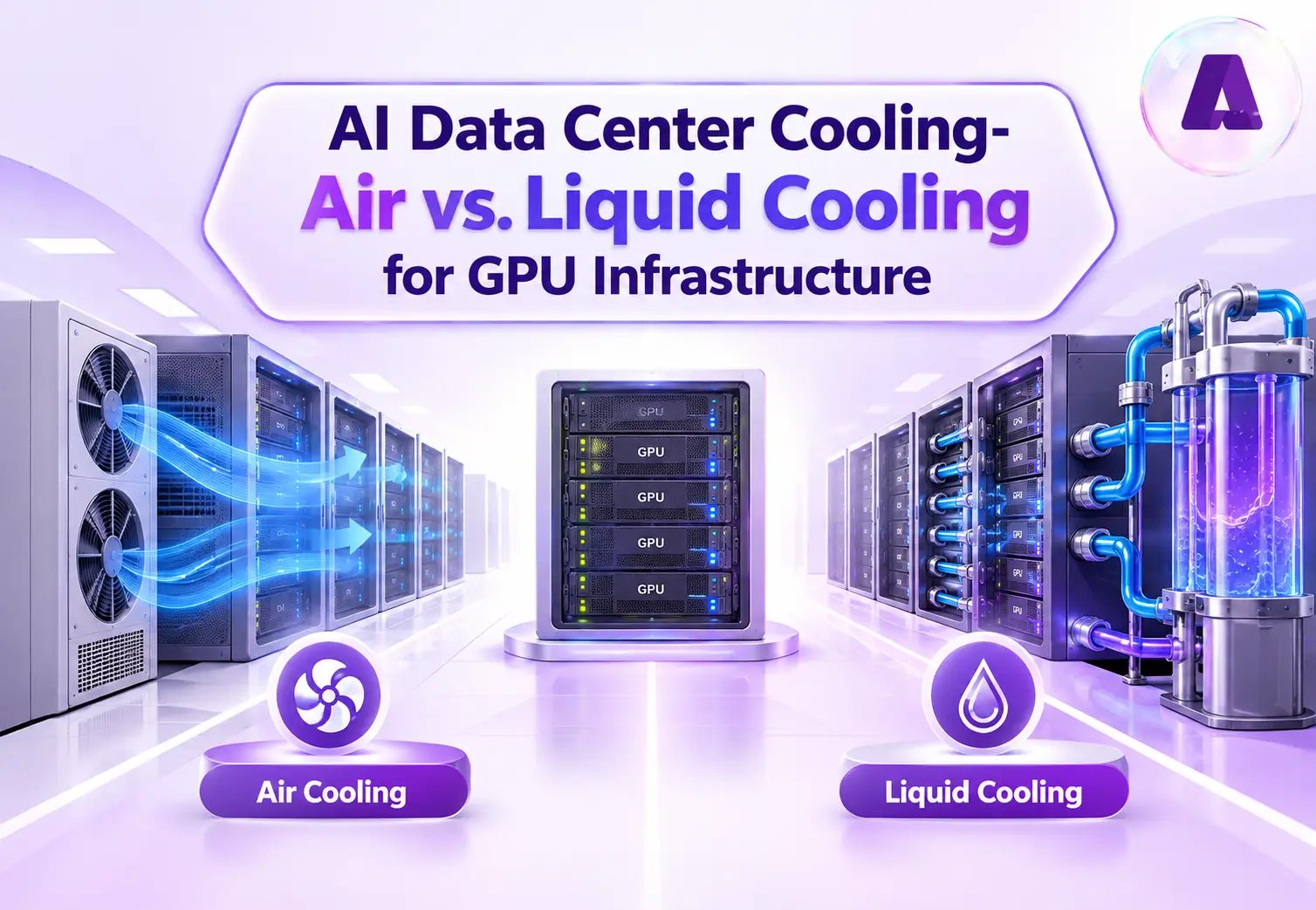
Introduction
Data centers supporting AI workloads are transforming the way facilities are designed and operated. High-end GPUs used in large-scale AI training clusters consume more than 1,000 watts each, while reference rack architectures for advanced AI exceed 100 kW per rack. Since next-generation systems increase its computing capacity, rack power densities are expected to reach several hundred kilowatts. This increase in power density also leads to significantly higher heat generation.
Leveraging effective AI data center cooling helps to maintain stable temperatures, protect hardware, and ensure reliable performance. Traditional air cooling remains practical for many data center environments as it is familiar and relatively simple to maintain. However, higher rack power density can push conventional airflow-based systems towards their limits. Liquid cooling is one alternative, with around 22% of data centers currently using it to improve cooling efficiency.
However, liquid cooling is not automatically the right choice for every AI data center buildout. The best approach depends on factors such as GPU density, workload requirements, infrastructure design, and operational needs. This guide compares air and liquid cooling to help enterprises understand which approach best fits their GPU infrastructure needs.
Thermal Challenge of AI Workloads
AI workloads, including LLM training, computer vision, and real-time inference, rely on high-performance GPUs such as NVIDIA A100, H100, and AMD Instinct MI300. When running at high utilization, these processors generate substantial amounts of heat. With dozens of GPUs installed in a single rack, heat density can reach levels that are difficult for conventional cooling systems to manage.
This creates several challenges:
- Higher heat density: AI racks reach 50 kW or more, with some high-density deployments exceeding 100 kW per rack.
- Thermal throttling: Insufficient heat removal causes GPUs to reduce performance to stay within safe operating temperatures.
- Greater cooling requirements: Higher rack densities require more airflow, cooling capacity, and careful thermal management.
- Higher space and energy demands: Supporting dense GPU deployments requires additional cooling infrastructure and facility capacity.
Traditional air cooling uses fans, heat sinks, airflow management, and chilled air to remove heat from IT equipment. But as GPU rack densities rise, moving enough air through tightly packed systems becomes more challenging.
This is where liquid cooling becomes an important alternative for high-density GPU infrastructure.
What Is Liquid Cooling in AI Data Centers?
Liquid cooling is a thermal management method that uses a circulating liquid, such as water or specialized coolant, to absorb and remove heat from electronic components far more efficiently than air.
The global data center liquid cooling market is projected to grow from US$5.7 billion in 2026 to US$29.2 billion by 2033. The rapid adoption of AI, high-performance computing (HPC), hyperscale infrastructure, and cloud workloads is driving demand for liquid cooling capable of managing higher heat densities.
Liquid cooling can also improve data center energy efficiency by reducing the energy required for heat removal, which can contribute to lower Power Usage Effectiveness (PUE), reduced cooling-related energy consumption, and lower carbon emissions. These benefits make liquid cooling an important technology for supporting the data center industry’s sustainability goals.
How Does AI Data Center Liquid Cooling Work?
Liquid cooling transfers heat from processors or other high-temperature components into a circulating coolant. The heated fluid then moves through a heat exchanger or cooling loop, where the heat is removed before the coolant is circulated back through the system.
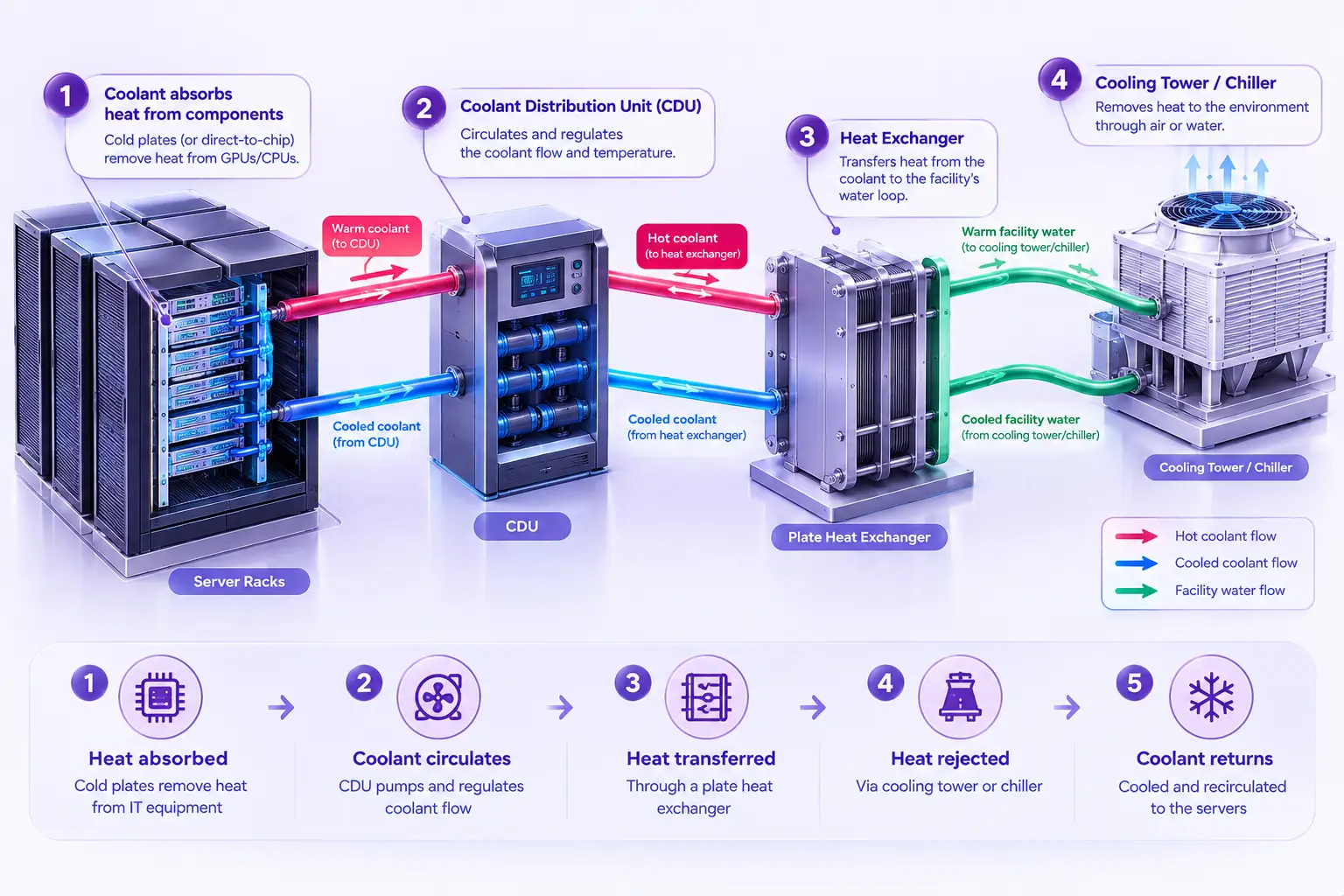
The three common approaches include:
Direct-to-chip cooling
A cold plate is mounted directly on heat-generating components such as CPUs and GPUs. Coolant flows through the cold plate, absorbs heat from the processor, and carries it away through a closed-loop system.
Immersion cooling
Servers or individual components are submerged in a non-conductive dielectric fluid. The coolant absorbs heat directly from the hardware, reducing the need for conventional airflow-based cooling.
Rear-door heat exchangers
A heat exchanger is installed at the rear of a server rack. Hot air leaving the servers passes through the exchanger, where its heat is transferred to a liquid cooling loop before the air returns to the data center environment.
NVIDIA’s latest AI infrastructure, designed to build next-gen AI factories, provides an example of where this technology is heading. The Rubin generation of NVIDIA AI infrastructure is the world’s first to achieve 100% liquid cooling. This is cooled entirely by liquid in a closed loop with no fans anywhere in the system. NVIDIA says the system can operate with coolant entering at temperatures as high as 45°C (113°F). This allows data centers to reject heat without always relying on energy-intensive mechanical chilling.
Liquid cooling does not automatically replace air cooling in every data center. For lower-density workloads, conventional air cooling may remain practical.
What Is Air Cooling in AI Data Centers?
Air-based cooling is a traditional thermal management method that uses fans, air handlers, chillers, and computer room air conditioning (CRAC) or computer room air handling (CRAH) units to circulate cool air through the data center and remove heat from IT equipment.
Uptime Institute’s 2025 survey says most data centers still rely on traditional air cooling, although direct liquid cooling adoption is gradually increasing. Air cooling remains widely used because it is well-established, relatively simple to deploy, and compatible with conventional data center infrastructure. It can be effective for standard enterprise servers and moderate-density workloads.
Air cooling systems typically achieve a PUE of 1.25 to 1.80, but hit a physical engineering limit at roughly 25 to 41 kW per rack. At higher densities, additional fans and cooling equipment may increase energy consumption, while airflow constraints can make it difficult to remove heat efficiently.
How Does Air Cooling Works?
In an air-cooled data center, cool air is directed toward servers and other computing equipment. Fans move the heated air away from the equipment and return it to the cooling system, where the heat is removed before the air is circulated again.
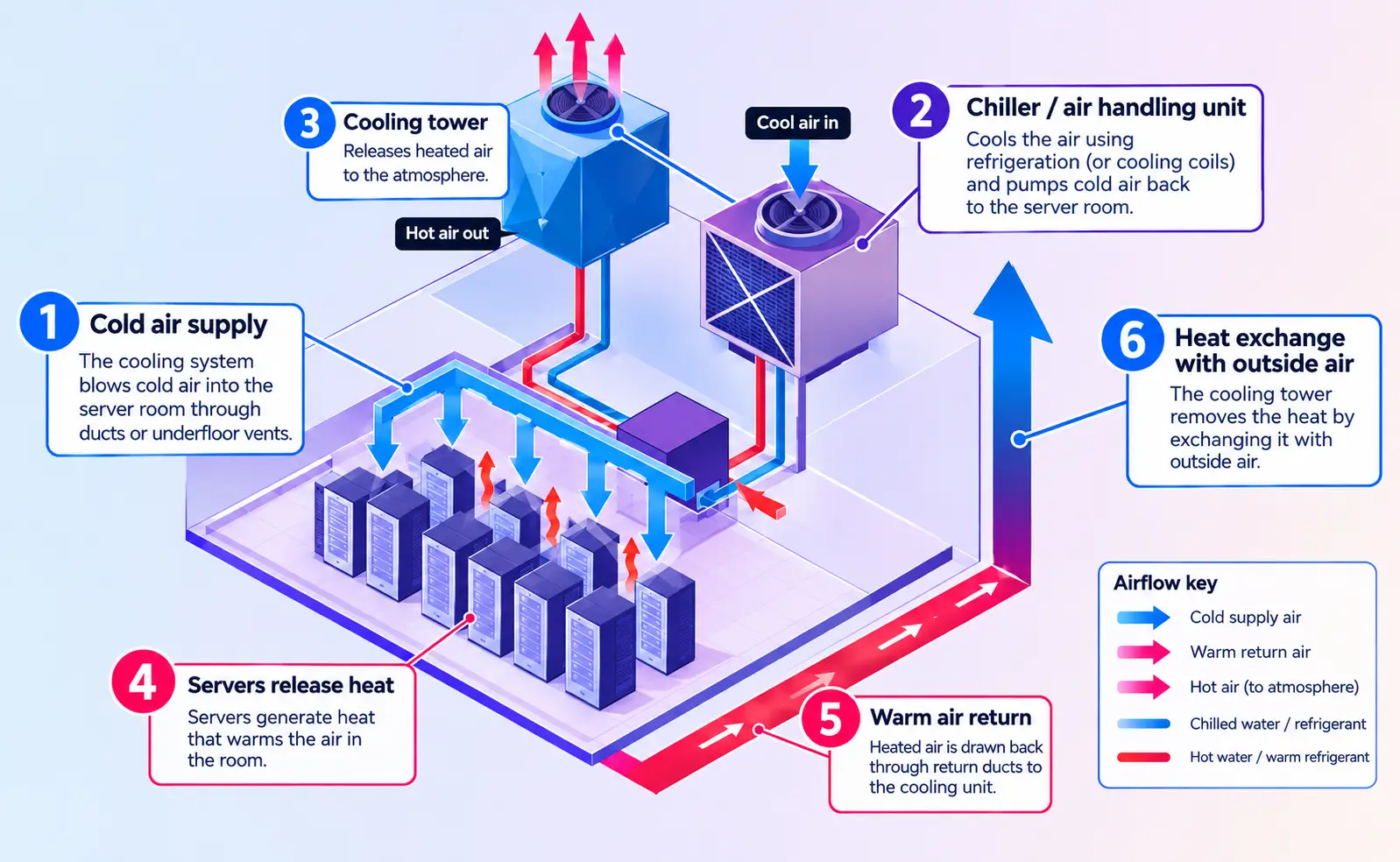
Common approaches include:
Room-Based Air Cooling
In this design, large cooling units known as CRAC or CRAH supply cold air to the data center space. Cold air is delivered through raised-floor plenums and distributed through perforated floor tiles positioned in front of server racks. The servers draw in the cold air from the front of the rack, where it absorbs heat from the equipment. The heated air then exits through the back of the rack.
To improve airflow management, server racks are typically arranged in hot aisle and cold aisle configurations:
- Cold aisles supply cool air to the front of the servers.
- Hot aisles collect the hot exhaust air from the rear of the servers.
This layout helps prevent hot and cold air from mixing, improving airflow management and cooling efficiency.
Close-Coupled Air Cooling
Instead of relying primarily on perimeter cooling units to condition the entire data center room, these systems position cooling equipment directly within or near the server rows. Common examples include:
- In-row cooling units are installed between server racks. They draw hot air from the hot aisle, cool it, and discharge the cooled air back toward the cold aisle.
- Rear-door heat exchangers are mounted on the rear of server racks and remove heat from the air immediately after it exits the servers. This allows heat to be captured closer to its source before it spreads into the wider data center environment.
However, these systems still depend on air to transfer heat away from the servers. As rack power densities reach very high levels, moving sufficient air through the equipment can become challenging, making liquid cooling a more practical option for some high-density AI and HPC environments.
The key question, therefore, is not simply whether liquid cooling is better than air cooling, but which cooling architecture can efficiently support the required compute density, power availability and operating conditions.
Air Cooling Vs Liquid Cooling Data Center: 20 Key Differences
When comparing air cooling vs. liquid cooling in a data center, the decision goes beyond heat-transfer capacity. Enterprises should evaluate rack power density, GPU thermal requirements, infrastructure complexity, energy consumption, water usage, maintenance, scalability, and total cost of ownership.
| Factors | Air Cooling | Liquid Cooling |
| Cooling Method | Use air conditioning to absorb and carry heat away from IT equipment. | Use a liquid coolant to absorb heat directly or indirectly from high-temperature components. |
| Heat transfer capability | Lower heat-transfer capacity because air has low thermal conductivity and heat capacity. | Higher heat-transfer capability. |
| GPU thermal management | Relies mainly on server fans and facility airflow | Transfer heat directly from GPUs through cold plates or dielectric fluid. |
| Rack power density | Depends on airflow, server design, supply-air temperature, and facility capacity. | Supports substantially higher rack power densities with appropriate infrastructure. |
| Cooling architecture | Include CRAC/CRAH units, chillers, air distribution systems, containment, and server fans. | May include CDUs, cold plates, coolant loops, heat exchangers, pumps, facility water loops, and heat-rejection equipment. |
| Infrastructure complexity | Relatively simple and familiar for conventional data centers. | More complex because it introduces liquid distribution, pumping, controls, and additional heat-transfer equipment. |
| Installation | Easy to install in existing data centers. | Requires careful planning of piping, CDUs, rack connections, coolant loops, and facility systems. |
| Retrofitting | Easy to retrofit into existing facilities. | Possible, but requires detailed mechanical, electrical, rack, and heat-rejection assessments. |
| Rear-door heat exchanger (RDHx) | Can be used as an enhancement to conventional air-cooled racks. | Uses liquid to remove heat from server exhaust and can support higher rack densities. |
| Heat Rejection | Heat is rejected through air-cooled condensers. | Heat is transferred through liquid loops and rejected using heat exchangers. |
| Water usage | Low to none at the cooling system | Low to moderate; Water consumption mainly depends on the facility’s heat-rejection system. |
| Noise | Higher fan speeds can increase acoustic output. | Reduce some fan-related noise, although pumps and remaining fans still produce noise. |
| Physical space | Requires sufficient space for airflow paths and cooling equipment. | Lower the airflow infrastructure required around dense racks but needs space for CDUs, piping, and associated equipment. |
| Maintenance expertise | Most data center technicians are familiar with air-conditioning and airflow systems. | Requires personnel familiar with coolant loops, pumps, CDUs, leak detection, and liquid-cooling components. |
| Leak risk | No coolant leakage risk from conventional server cooling. | Requires leak detection, monitoring, isolation mechanisms, and appropriate procedures for handling coolant. |
| Scalability | Scaling to higher densities may require additional cooling capacity and airflow improvements. | More suitable for scaling high-density GPU clusters when liquid infrastructure is designed accordingly. |
| AI workload suitability | Suitable for lower- and moderate-density AI workloads within the facility’s cooling capacity. | Particularly suitable for training, inference, HPC, and other workloads using dense GPU clusters. |
| Total cost of ownership | Lower upfront cost, but potentially higher operating cost. For a 1MW data center, TCO could be $15.91M. | Higher upfront investment, potentially lower TCO. For a 1MW data center, TCO could be $15.26M. |
| Deployment speed | Generally faster when existing air-cooled infrastructure is available. | Deployment can take longer because facility modifications and validation are often required. |
Comparing all the given factors, air cooling remains a cost-effective and simpler choice for moderate-density data centers. On the other hand, liquid cooling offers superior thermal efficiency, scalability, and potentially lower TCO for high-density AI and GPU workloads.
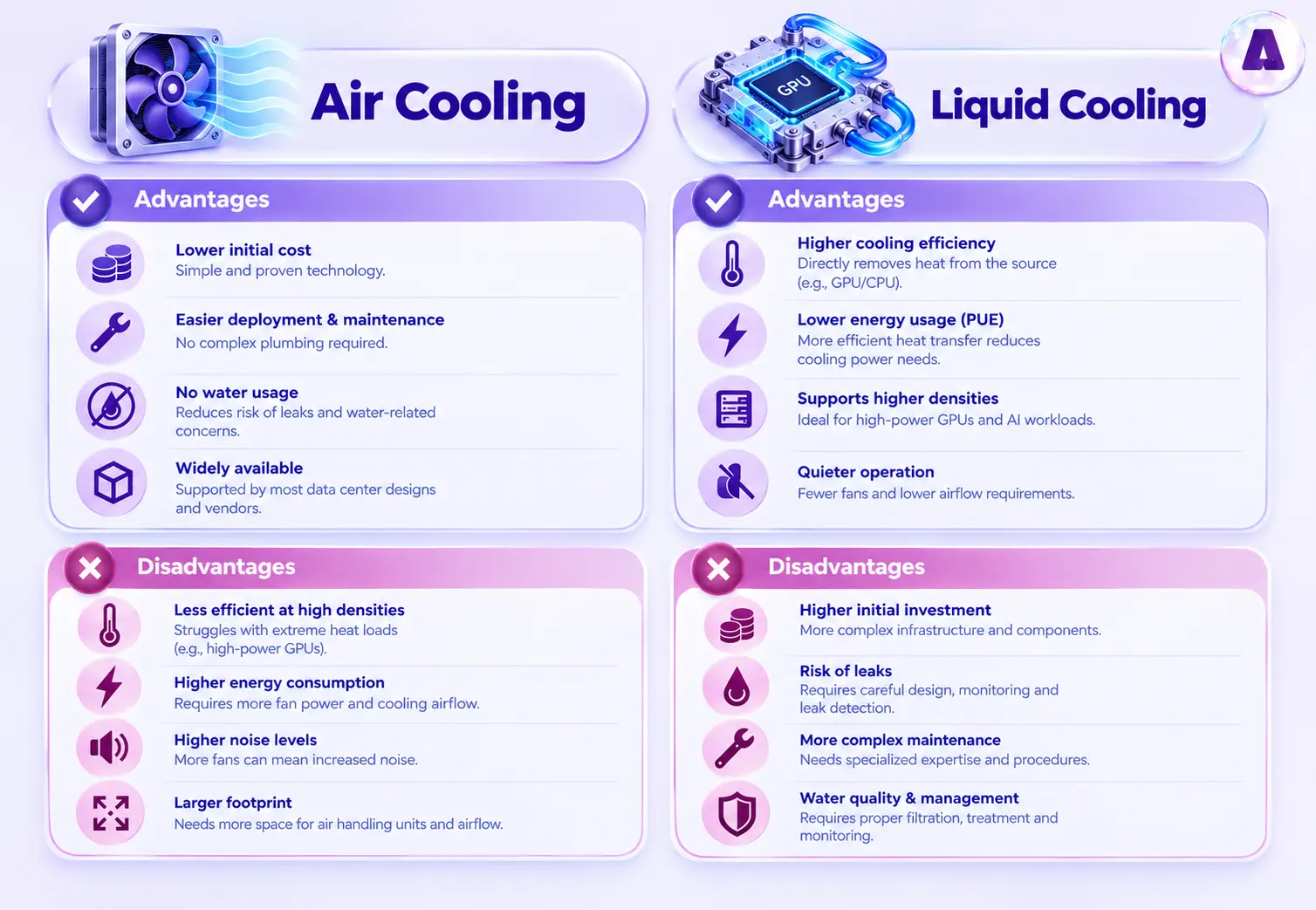
Air Cooling Vs Liquid Cooling Data Center: Advantages and Disadvantages
Here are a few pros and cons of air cooling and liquid cooling data center systems:
How to Decide Between Air and Liquid Cooling Data Center?
Enterprises evaluating AI data center cooling strategies should consider a few key questions before committing capital:
- What is the projected rack density over the next three to five years, not just today’s workload?
- Does the facility’s power and water infrastructure support a liquid cooling retrofit, or would it require a ground-up redesign?
- What is the total cost of ownership across both approaches, including energy costs, cooling overhead, and downtime risk?
- Is the workload GPU-dense training and inference, or lighter storage and general compute that can remain air-cooled?
For many enterprises, the practical answer is not an either-or decision but a hybrid one, connected through a thermal design that treats the following as part of a single system.:
- Liquid cooling for GPU-dense racks
- Air cooling for the rest of the facility
Which Companies Use Air Cooling Vs Liquid Cooling Data Center?
The choice between air and liquid cooling largely depends on workload density, GPU power requirements, and the thermal demands of the infrastructure.
Next-generation AI and HPC chips can exceed 1,000 W TDP, making standard air cooling insufficient for extreme heat loads. Retrofitting data centers with chilled-water infrastructure is costly and time-consuming.
Google Brazos addresses this with a rack-mounted, closed-loop liquid-to-air cooling system that enables high-density liquid-cooled equipment in existing air-cooled data centers. With one-rack-at-a-time deployment and an isolated IT liquid loop, Brazos delivers high-performance liquid cooling without major facility upgrades.
Meta
Meta’s newest AI-optimized data centers primarily use closed-loop liquid cooling, which continuously recirculates water or coolant through the system. This efficiently removes heat from high-density GPU servers while requiring very little ongoing water consumption.
For newer facilities, Meta combines liquid cooling with dry coolers, transferring heat to outside air without continuously consuming water. Existing facilities can use Air-Assisted Liquid Cooling (AALC) to support high-density AI hardware without completely rebuilding their cooling infrastructure.
In 2025, Meta introduced IcePack, a liquid-cooled network rack platform shared openly through the Open Compute Project (OCP). This approach supports scalable, resource-efficient cooling while helping the broader industry adopt liquid-cooling technologies.
Equinix
Equinix uses a combination of airflow management, air cooling, and high-density cooling technologies to remove heat from its data centers.
Depending on the data center design and equipment density, Equinix can use CRAC/CRAH or chilled-water air-handling systems, while higher-density deployments can use in-row coolers or rear-door heat exchangers to provide additional cooling. For workloads requiring even greater cooling capacity, Equinix also offers direct-to-chip liquid cooling.
How Aptly Technology Helps Enterprises Get AI Data Center Cooling Right?
Choosing between air and liquid cooling is an infrastructure strategy decision that affects training timelines, hardware ROI, and long-term scalability. Aptly Technology helps enterprises plan and deploy AI-ready data center infrastructure with cooling considered from the design stage. Its AI data center buildout & support services include power and cooling validation, rack-density planning, thermal zoning, airflow optimization and liquid-cooling readiness.
Aptly’s approach includes:
- Cooling and rack-density assessment: Aptly validates data center design and rack layouts against GPU density and the expected AI workload roadmap.
- Thermal and airflow planning: Integrated GPU racks undergo power mapping, structured cabling, and airflow optimization before deployment.
- Liquid-cooling readiness: For high-density GPU environments, Aptly evaluates cooling capacity and liquid-cooling requirements where applicable rather than treating cooling as an afterthought.
- Power and cooling alignment: Cooling capacity is evaluated alongside PDU capacity, thermal zones and power requirements to ensure the facility can support the intended rack density.
- Validation before production: GPU infrastructure is stress-tested and benchmarked before production readiness, helping identify thermal, PCIe, interconnect and performance issues early.
- Ongoing monitoring and support: After deployment, Aptly provides continuous infrastructure monitoring, GPU support, incident management, preventive maintenance, and capacity management.
This matters because cooling problems can quickly become GPU performance problems. Insufficient thermal capacity can contribute to hotspots, throttling, unstable workloads and inefficient use of expensive GPU capacity. Aptly therefore positions cooling as part of a broader infrastructure strategy rather than a separate facilities concern.
Conclusion
Air cooling isn’t disappearing, but it is no longer sufficient on its own for GPU-dense AI infrastructure. As chip power continues to climb with each hardware generation, liquid cooling is shifting from a specialized option to a baseline requirement for organizations serious about scaling AI workloads. The enterprises that plan their AI data center cooling strategy early, rather than retrofitting under pressure, will be the ones best positioned to scale AI infrastructure efficiently and reliably.
Planning your next AI infrastructure deployment? Talk to Aptly Experts to assess your power, cooling, and infrastructure requirements.
FAQs
Q1: Can Existing Data Centers Be Retrofitted for Liquid Cooling?
Yes, but the feasibility depends on the original design.
- The first step is an infrastructure assessment covering mechanical systems, electrical capacity, rack layouts, cooling capacity, floor loading, piping routes, and heat rejection.
- The next stage may involve CDU deployment, secondary coolant loops, rack-level connections, and modifications to heat rejection systems.
- Then review electrical infrastructure because high-density GPU racks can require substantially more power than conventional server racks. Cooling and electrical capacity should therefore be planned together.
- Leak detection and monitoring are also important.
Q2: What is the best cooling system for an AI data center?
The best cooling system depends on GPU power, rack density, facility design, and workload requirements. Air cooling can support moderate densities, while direct-to-chip or other liquid cooling approaches are better suited to high-density GPU infrastructure.
Q3: When does air cooling become insufficient for GPU infrastructure?
Air cooling becomes challenging when GPU heat loads exceed the facility’s practical airflow and heat-removal capacity. The limit depends on rack power density, server configuration, ambient conditions, and cooling infrastructure rather than one fixed kW/rack value.
Q4: Is liquid cooling better than air cooling for GPUs?
Liquid cooling generally provides greater heat-transfer capability and is well suited to high-power GPUs. However, it requires additional infrastructure and operational expertise, so it is not automatically the best choice for every deployment.
Q5: Why do AI data centers need liquid cooling?
High-density GPU systems generate substantial heat in a relatively small physical space. Liquid cooling can remove this heat more efficiently than relying entirely on high-volume airflow, making it useful for dense GPU clusters.
Q6: What cooling architecture is best for high-density GPU clusters?
Direct-to-chip cooling is a strong option for many high-density GPU clusters because it transfers heat directly from GPUs through cold plates and a coolant loop. RDHx and immersion cooling can also be appropriate depending on infrastructure and workload requirements.
Q7: What is the difference between air cooling, RDHx, direct-to-chip, and immersion cooling?
Air cooling uses conditioned air to remove heat from servers. RDHx removes heat from hot server exhaust using a liquid-cooled heat exchanger at the rear of the rack. Direct-to-chip cooling uses cold plates attached directly to GPUs or CPUs. Immersion cooling places equipment in a dielectric fluid that absorbs heat directly.
Table of content
- Introduction
- Thermal Challenge of AI Workloads
- What Is Liquid Cooling in AI Data Centers?
- How Does AI Data Center Liquid Cooling Work?
- What Is Air Cooling in AI Data Centers?
- How Does Air Cooling Works?
- Air Cooling Vs Liquid Cooling Data Center: 20 Key Differences
- Air Cooling Vs Liquid Cooling Data Center: Advantages and Disadvantages
- How to Decide Between Air and Liquid Cooling Data Center?
- Which Companies Use Air Cooling Vs Liquid Cooling Data Center?
- How Aptly Technology Helps Enterprises Get AI Data Center Cooling Right?
- Conclusion
- FAQs