Introduction: Why GPUs Define the Modern Datacenter
By 2026, enterprises will run AI as always-on, business-critical systems, pushing CPU-only datacenters beyond their practical limits. A GPU datacenter strategy provides parallelism, performance consistency, and energy efficiency required to operate AI at production scale.
Modern GPU datacenters must be architected differently across compute, networking, power, and cooling to handle high-density workloads reliably.
Separating AI training and AI inference infrastructure is essential for scalability, utilization, and cost control. Enterprises that delay GPU datacenter planning risk operational bottlenecks, rising infrastructure costs, and reduced competitiveness.
What Is a GPU Datacenter?
A GPU Datacenter is a data center designed to run GPU-accelerated workloads such as machine learning, deep learning, data analytics, and scientific computing.
Unlike CPU-centric infrastructure designed for general-purpose computing, GPU datacenter architecture is purpose-built for massively parallel workloads and emphasizes:
- Parallel computing to process thousands of operations simultaneously
- High-bandwidth memory for rapid data access and model training
- Advanced networking (such as InfiniBand) to enable low-latency GPU-to-GPU communication
- Specialized cooling and power delivery to support high-density, energy-intensive GPU deployments
Why GPU Datacenters Matter in 2026
By 2026, enterprise AI is no longer confined to pilots, proofs of concept, or isolated innovation teams. AI systems are increasingly always-on, embedded directly into core business processes – from real-time decisioning and automation to customer engagement and operational optimization.
As these workloads become mission-critical, organizations can no longer rely on opportunistic or ad hoc compute resources. A deliberate GPU datacenter strategy becomes mandatory, ensuring the performance, reliability, and scalability required to support AI at production scale.
1. AI Is No Longer Experimental
Generative AI, LLMs, and predictive analytics are now core business capabilities, not innovation labs.
Microsoft reports that enterprises deploying AI at scale require GPU infrastructure purpose-built for inference and training, not general-purpose servers.
2. CPU-Only Datacenters Are Bottlenecks
GPUs outperform CPUs by 10x-100x for AI workloads, particularly when training large models, because CPUs are constrained by limited parallelism and memory bandwidth, making them inefficient for the massively parallel matrix operations that modern AI workloads require.
AI workloads demand:
- Massive parallelism
- Low-latency memory access
- High throughput
3. Competitive Advantage Depends on Compute Speed
Faster model training and inference translate to:
- Quicker decision-making
- Real-time personalization
- Reduced operational latency
Key Benefits of a GPU Datacenter Strategy
A well-defined GPU datacenter strategy enables enterprises to scale AI workloads efficiently, improve performance and energy efficiency, and build a resilient foundation for always-on, business-critical AI systems in 2026 and beyond.
1. Accelerated AI & ML Performance
GPU servers for AI workloads dramatically reduce training times – from weeks to hours.
2. Scalable Enterprise AI Infrastructure
A well-designed GPU datacenter buildout supports:
- AI experimentation
- Production-scale inference
- Multi-tenant AI workloads
3. Energy & Power Efficiency
Modern GPUs deliver more compute per watt compared to CPUs, improving GPU datacenter efficiency.
4. Support for Advanced Use Cases
- Fraud detection
- Autonomous systems
- Digital twins
- Real-time recommendations
GPU Datacenter Architecture: Core Components
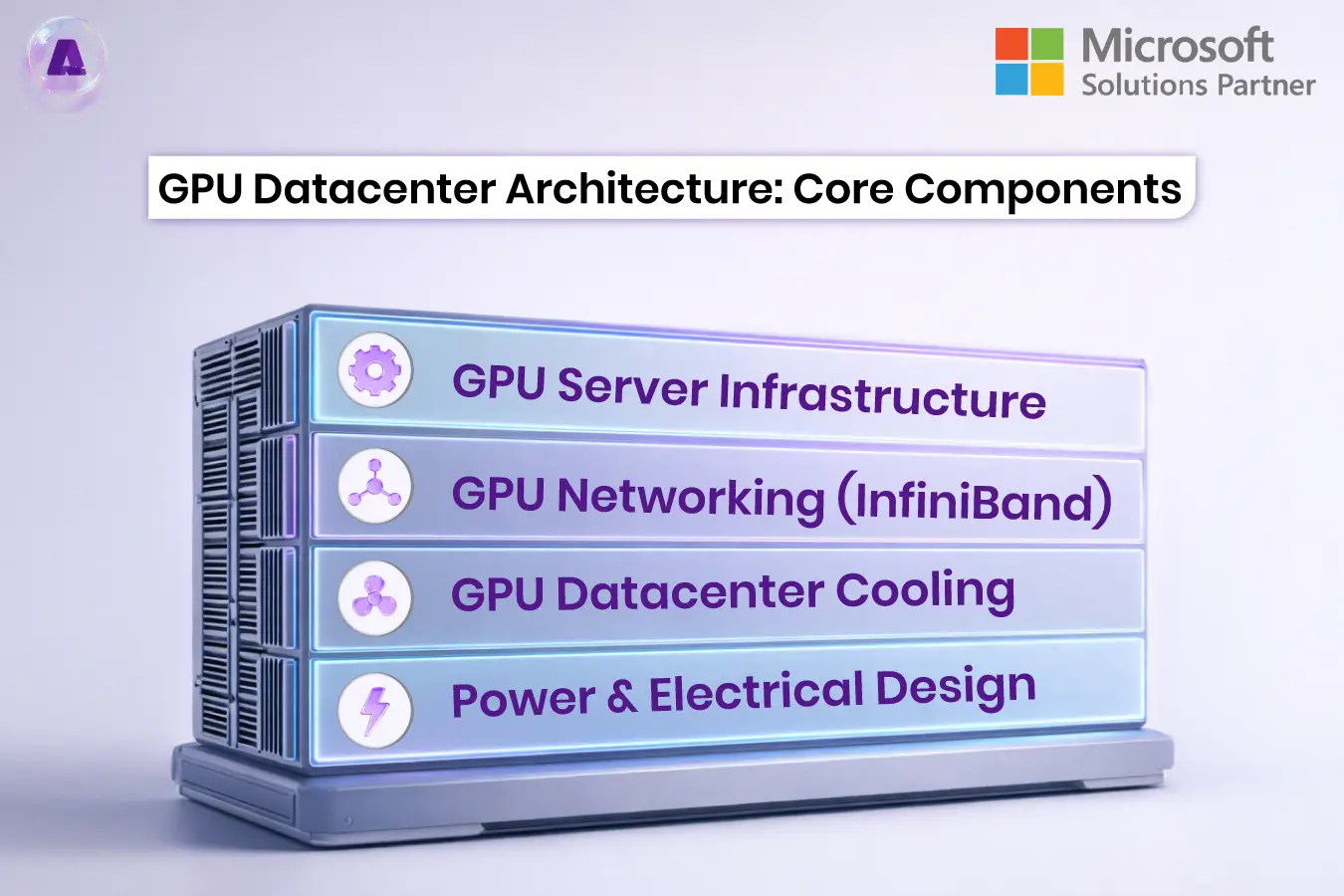
A modern GPU datacenter architecture is built around tightly integrated compute, networking, power, and cooling components designed to sustain high-density, GPU-accelerated workloads at scale.
1. GPU Server Infrastructure
- High-density GPU cloud servers
- Support for MIG (Multi-Instance GPU) data centers
- Vendor examples include solutions powered by NVIDIA.
2. GPU Networking (InfiniBand)
GPU clusters rely on InfiniBand networking for:
- Ultra-low latency
- High throughput
- Efficient GPU-to-GPU communication
3. GPU Datacenter Cooling
GPU datacenter cooling is critical due to high thermal density:
- Liquid cooling
- Immersion cooling
- Advanced airflow containment
4. Power & Electrical Design
GPU power & cooling requirements are significantly higher than CPU environments, requiring:
- Redundant power feeds
- Intelligent power management
- Energy-aware scheduling
AI Training vs AI Inference Infrastructure
| Feature | AI Training | AI Inference |
| Compute Demand | Extremely high | Moderate but continuous |
| GPU Type | High-memory GPUs | Cost-optimized GPUs |
| Latency Sensitivity | Medium | Very high |
| Scaling Model | Batch scaling | Horizontal scaling |
Key Takeaway: This distinction is critical in 2026, as many enterprises struggle to scale AI effectively by treating AI training and AI inference as identical infrastructure problems, rather than designing purpose-built GPU environments for each workload.
On-Prem GPU Datacenter vs Cloud GPU
On-Prem GPU Datacenter
Pros
- Full data control
- Predictable performance
- Lower long-term cost at scale
Cons
- High upfront GPU datacenter cost breakdown
- Power and cooling complexity
GPU Cloud Infrastructure
Pros
- Elastic scaling
- Faster deployment
- Access to latest GPU models
Cons
- Higher long-term operational costs
- Data residency concerns
Challenges in Adopting GPU Datacenters (And Solutions)
In practice, many GPU datacenter initiatives underperform not because of GPU capability, but due to misalignment between workload characteristics, power and cooling constraints, and operational readiness. Enterprises that approach GPU adoption as a hardware upgrade – rather than an end-to-end infrastructure transformation – often encounter avoidable scaling and efficiency challenges.
Challenge 1: Cost
Solution:
- Start with GPU cluster design pilots
- Use MIG-enabled GPUs for better utilization
Real-world example:
A global financial services organization introduced GPUs to accelerate fraud detection models but initially over-provisioned full GPUs for development and testing workloads. GPU utilization remained below 30%, driving high costs without proportional performance gains. By redesigning the environment around pilot GPU clusters and enabling Multi-Instance GPU (MIG) partitioning, the organization increased utilization across multiple teams while deferring large-scale capital investment until workloads were production ready.
Takeaway:
Cost challenges often stem from over-sizing too early, not from GPU pricing itself.
Challenge 2: Power & Cooling
Solution:
- Adopt liquid cooling
- Optimize GPU datacenter power efficiency
Real-world example:
A manufacturing enterprise deploying AI-driven digital twins experienced repeated thermal throttling when retrofitting GPUs into an existing air-cooled datacenter. GPU performance degraded under sustained workloads, impacting simulation timelines. After migrating high-density GPU racks to a liquid-cooled zone and redesigning power distribution for higher rack densities, the organization stabilized performance and reduced unplanned downtime during peak compute periods.
Takeaway:
GPU performance issues are often infrastructure-induced, not software-related.
Challenge 3: Skills Gap
Solution:
- Partner with a Microsoft-trusted GPU supplier
- Use 24×7 GPU operations support
Real-world example:
A healthcare analytics provider built an on-prem GPU environment to support AI diagnostics but faced delays due to limited in-house expertise in GPU scheduling, driver optimization, and performance monitoring. Rather than expanding internal teams immediately, the organization partnered with an ecosystem vendor aligned with Microsoft GPU platforms and implemented 24×7 GPU operations support. This allowed internal teams to focus on model development while operational maturity improved incrementally.
Takeaway:
The GPU skills gap is often an operational maturity issue, not a staffing failure.
Best Practices for GPU Datacenter Optimization
- Design for AI-first workloads
- Use GPU utilization monitoring
- Separate training and inference clusters
- Implement GPU scheduling and orchestration
- Plan power & cooling before hardware procurement
Emerging Trends in GPU Datacenters (2026+)
As enterprise AI adoption accelerates, GPU datacenters are evolving beyond simple compute acceleration toward AI-native, highly integrated infrastructure models designed for scale, efficiency, and long-term operational sustainability.
- GPU-powered computing replacing CPU-heavy stacks
- Hyperscale datacenter support models
- Increased adoption of GPU-based computing for non-AI workloads
- Industry shift toward AI-native datacenter design
Future of GPU Datacenters in 2026
Enterprises without a GPU datacenter strategy will struggle to scale AI initiatives competitively.
The future of GPU datacenters in 2026 is defined by:
- Hybrid GPU datacenter architectures
- AI-first enterprise infrastructure
- Tight integration between hardware, software, and operations
FAQs: GPU Datacenter Strategy in 2026
Q. Why do data centers need GPUs in 2026?
Data centers need GPUs in 2026 because AI, analytics, and high-performance computing workloads demand massive parallelism, which CPUs cannot deliver cost-effectively, making GPU-accelerated infrastructure essential for performance, scalability, and efficiency.
Q. What is the best GPU datacenter architecture for enterprises?
There is no single best architecture for all enterprises. In practice, many organizations adopt a hybrid GPU datacenter model, combining on-prem GPU infrastructure for predictable, data-sensitive workloads with GPU cloud resources for elastic scaling and burst demand – balancing control, flexibility, and cost efficiency.
Q. How expensive is a GPUdatacenter buildout?
Costs vary based on GPU type, cooling, power, and networking, but enterprises should plan for higher upfront CapEx with long-term ROI.
Q. Are GPUs only for AI workloads?
No. GPUs are also used for simulations, rendering, data analytics, and scientific computing.
Q. What role does cooling play in GPU datacenters?
GPU datacenter cooling is critical to maintain performance, reduce failures, and control operational costs.
Conclusion: Build Your GPU Datacenter Strategy Now
A GPU Datacenter strategy is the foundation of enterprise AI infrastructure in 2026. From GPU deployment and cluster design to power efficiency and hybrid models, enterprises must plan holistically.
Next Step:
If your organization is planning AI scale-out, now is the time to evaluate your GPU datacenter architecture and cloud strategy with Aptly Technology.