

Introduction: Why Idle GPUs are a Strategic Problem, not just a Billing Line
AI is transitioning from experimental POCs to business‑critical capabilities. Organizations are training large models, deploying generative assistants, and embedding inference into customer journeys and internal workflows. Analysts now talk about AI spending reaching into the trillions globally over the next few years, with infrastructure (compute, storage, network) making up a significant chunk of that investment. At the same time, FinOps and Gartner cloud cost reports show organizations wrestling with the specific economics of AI, including idle GPU cost in cloud environments, token charges for foundation model APIs, and SaaS subscriptions for AI tooling.
In this context, it’s important to be precise about what you’re fighting. Stranded GPU capacity means GPU resources that are provisioned and paid for, but effectively unusable for productive AI work due to issues like overprovisioning, siloed ownership, poor scheduling, or data bottlenecks; these GPUs are technically available but practically idle.
Why GPUs Stay Idle:
- Clusters are sized for peak, not reality, creating underutilized GPUs and stranded GPU capacity that sit idle between bursts.
- Siloed ownership and fragmented estates hide unused GPU resources, even as teams request more hardware and cloud GPU cost climbs.
- Weak GPU scheduling and poor data pipelines cause GPUs to wait on I/O, turning expensive accelerators into idle compute resources instead of engines of AI infrastructure efficiency.
- Limited observability and missing AI cost governance prevent leaders from seeing where AI compute cost optimization is needed most.
Understanding Idle GPU Cost: Where the Money Actually Goes
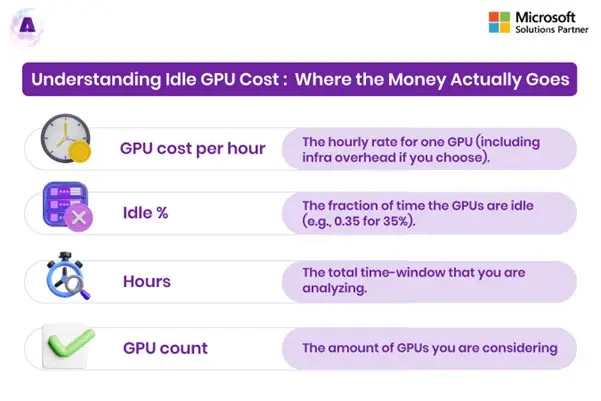
Idle GPUs don’t just nudge your cloud bill up a little, they quietly consume a meaningful share of your AI budget with nothing to show for it. To tackle GPU cost optimization seriously, you first need to see exactly how idle GPU cost accumulates and which parts of your estate is bleeding the most money. This can be done using a simple model/formulae:
Idle GPU Cost = GPU cost per hour × Idle % × Hours × GPU count
Where:
- GPU cost per hour is the hourly rate for one GPU (including infra overhead if you choose).
- Idle% is the fraction of time the GPUs are idle (e.g., 0.35 for 35%).
- Hours is the total time-window that you are analyzing.
- GPU count is how many GPUs you are considering.
Beyond the Hourly Rate: The Economic Impact of Stranded Capacity
On major clouds, a single high‑end GPU (such as an NVIDIA A100/H100 class, often surfaced via GPU Cloud Pricing pages or equivalent) can cost hundreds of dollars per day when run on‑demand. Multiply that by dozens or hundreds of GPUs, running 24×7, and you have a massive cost center.
Now factor in idle GPU cost:
- If a 32‑GPU cluster averages only 60% utilization, 40% of its capacity is idle.
- Over a month, that translates into thousands—or tens of thousands—of dollars in pure waste per cluster!
- At scale, across regions and environments, this can easily push into six or seven figures annually.
This is the most visible aspect of GPU cost management, but it’s only part of the story.
CASE STUDY: Cutting down $1M/year in Idle GPU Cost for a SaaS AI Platform
Baseline: Expensive GPUs, Low Utilization
A fast‑growing SaaS AI platform spent about 3.9M USD/year on 150 cloud GPUs (A100/H100 class), but cluster metrics showed only ~60% average utilization, leaving roughly 40% of capacity stranded as idle or underused compute. Teams united to launch a joint initiative to treat GPU utilization as an economic KPI, not just a technical metric, drawing on evidence that idle time can waste 30–50% of GPU cloud spending.
Actions: Visibility, Pooling, and Right-Sizing
They first deployed GPU‑aware observability, mapping utilization, idle hours, and cost to each product and customer to expose where GPUs sat below 30% usage for extended periods. Next, they consolidated fragmented, tenant‑dedicated clusters into a shared GPU pool with containerized scheduling and autoscaling, then right‑sized inference from premium GPUs to cheaper accelerators where latency allowed.
Outcome: $1.1M/year Idle GPU Cost Eliminated
As average utilization rose from ~60% to ~85–88%, the platform reduced its effective production fleet from 150 to about 108 GPUs without sacrificing SLAs. At roughly 3 USD/hour blended GPU pricing, this translated into ≈ 1.1M USD/year in eliminated idle GPU cost, while also freeing capacity for new AI features and faster experimentation.
The Indirect & Opportunity Costs:
Indirect costs of GPU waste in AI workloads include:
- Lost experimentation: Under pressure to “save capacity,” teams run fewer training runs or defer experiments, slowing innovation.
- Delays in production: Queues build up for shared clusters while other clusters remain underutilized.
- Higher risk aversion: The perception that “GPUs are too expensive” discourages experimentation with new workloads.
In other words, idle GPUs erode the return on AI investments on two fronts: overspending on infrastructure and under‑realizing potential value.
Why GPUs Remain Idle in AI Workloads?
Architectural Overprovisioning and Peak-Driven Capacity
The first major culprit is conservative capacity planning:
- Clusters are built to handle worst‑case loads, not typical daily traffic.
- AI teams demand large buffers to avoid SLA breaches for critical services.
- As a result, overprovisioned GPU clusters run under capacity most of the time.
This is compounded by limited or no GPU autoscaling, where the cluster size is static even when workloads drop.
Siloed Ownership & Fragmentation
Many organizations allocate GPUs by team or business unit:
- One team has “their” GPUs but isn’t fully consuming them.
- Another team waits for resources and is told there’s no budget.
- Therefore, there is little incentive to share or consolidate.
This fragmentation creates pockets of stranded GPU capacity: physically present and paid for, but practically unavailable to workloads that need it.
CASE STUDY: Breaking GPU Silos at a Fortune 500 Manufacturer with a Shared GPU Pool
The Challenge: Fragmented GPU Resources and Low Utilization
A Fortune 500 high‑performance computing and manufacturing company ran more than 5,000 GPUs across 1,800 servers for AI quality inspection, digital twins, and production optimization, but each department held dedicated capacity sized for peak. This fragmentation led to low GPU utilization (only 40–60% on average), persistent idle GPU cost, and delayed AI projects as some teams faced shortages while others had idle cards.
The Solution: Consolidating into a Multi‑Tenant GPU Pool
To eliminate stranded GPU capacity and improve GPU cost optimization, the manufacturer redesigned its architecture around a shared pool:
- Implemented a Kubernetes‑based GPU scheduling layer to orchestrate a central, shared GPU pool instead of team‑owned clusters.
- Enabled NVIDIA MIG partitioning and time‑slicing so multiple workloads could safely share each GPU, boosting GPU resource optimization.
The Outcome: $180K Annual Savings and 2,400 Developer Hours Recovered
The shift to a shared GPU pool delivered measurable savings and productivity gains:
- Saved the manufacturer over $180,000 annually by retiring excess hardware and lifting average GPU utilization from ~50% to above 80%.
- Recovered roughly 2,400 developer hours per year thanks to 99% faster virtual environment provisioning compared to traditional cluster spin‑up.
Scheduling Inefficiencies & Fragmented Utilization
Even when there is enough demand overall, poor GPU scheduling can leave capacity idle:
- Jobs that reserve whole nodes or whole GPUs without using them fully.
- Lack of bin‑packing or GPU allocation strategies that fit multiple smaller workloads on the same hardware.
- Minimal use of multi‑tenant GPU workloads and time‑slicing.
Analyses of AI at scale: where teams overspend on GPUs highlight how these GPU scheduling inefficiencies make clusters look “busy” while actual utilization remains low.
Data & Pipeline Bottlenecks
Storage and data architecture also play a huge role:
- If your training data can’t be fed fast enough, GPUs sit idle waiting for I/O.
- Suboptimal checkpointing and recovery workflows can prolong training beyond what is necessary.
- Inefficient feature pipelines cause inference jobs to stall.
DDN’s work on boosting GPU utilization for NVIDIA cloud and HPC environments, optimizing the data layer—throughput, layout, caching—can dramatically reduce AI compute waste, increase utilization, and cut time to result.
Lack of Monitoring, Cost Visibility, and Governance
Finally, you can’t fix what you can’t see:
- Without granular metrics on utilization and cost per GPU, per workload, and per team, idle GPU cost remains invisible.
- Without AI cost governance, there are no clear owners for GPU efficiency and spending.
- Without FinOps for AI workloads, finance and engineering speak different languages about AI cost.
The result: clusters continue running as they always have, with no feedback loop to push for better GPU cost optimization.
Training vs Inference: Different Patterns of GPU Waste
Training: Spiky Demand, High Risk of Stranded Capacity
Waste patterns:
- Clusters remain up between experiments for scenarios pertaining to “just-in-case,” creating idle compute resources for days or weeks.
- Teams overestimate the required capacity for safety, leading to overprovisioned GPU clusters.
- Without automation, expired experiments leave behind unused allocation.
Solutions drawn from GPU cost optimization for machine learning include ephemeral training clusters, aggressive GPU autoscaling, and job orchestration that spins resources up and down per run.
Inference: Persistent Services and Quiet Creep in Cloud GPU Cost
Waste patterns:
- Services sized for peak or promotional traffic but rarely scaled down afterward.
- Full GPUs are allocated to small models, instead of fine-grained sharing.‑grained sharing.
- Minimal use of batch processing and consolidation.
Here, GPU cost optimization for inference workloads focuses on right‑sizing GPU types, enabling GPU resource pooling, improving batching, and tuning autoscaling policies.
Quantifying the Problem: Idle GPUs by the Numbers
Industry commentary and FinOps resources provide some useful reference points:
- 30–40% idle GPU time: Common in enterprise clusters where static sizing and limited autoscaling are the norm.
- Up to 70% GPU spend wasted: Estimates from practitioner write‑ups argue that a majority of GPU spend can be non‑productive in poorly tuned environments.
- 25–40% cost reduction: Reported by organizations that focus on GPU utilization, rightsizing, and automation. ‑sizing, and automation.
- Dramatic gains in utilization and throughput: Vendors optimizing data flows for NVIDIA environments report nearing 99% GPU utilization and multiples of performance improvement through better storage and pipeline design.
These figures aren’t universal, but they show that meaningful savings and performance gains are possible if you take GPU efficiency seriously.
GPU Cost Optimization: Strategy and Tactics
To eliminate GPU waste in AI workloads, you need a consistent playbook that blends architecture, operations, and financial guardrails. The strategies below turn GPU cost optimization from ad‑hoc tuning into an ongoing discipline.
- GPU Utilization Optimization as a Core Objective: Instead of thinking only in terms of total GPU count, make GPU utilization optimization a first‑class KPI by using GPU monitoring and observability to track utilization by node, cluster, workload, and team, and setting clear targets (for example, 70–90% under load on training clusters). At the platform layer, apply Kubernetes GPU optimization, GPU resource pooling with multi‑tenant GPU workloads, and GPU load balancing for inference so you have fewer holes in your estate and more “full tiles” of productive work.
- Elastic GPU Scaling and Autoscaling: Static clusters almost guarantee idle GPU cost, so introduce elasticity with GPU autoscaling for both pods and nodes based on utilization, queue depth, and latency SLOs. For training, spin clusters up per job or pipeline run and tear them down automatically, and for inference, use scaling policies that expand quickly on spikes and contract when traffic drops, directly attacking idle compute resources and enabling cloud GPU cost optimization.
- Right Sizing and GPU Class Selection: Right‑sizing sits at the heart of GPU cost optimization: reserve premium GPUs only for complex model training and run simpler or lower‑intensity inference on mid‑range GPUs or CPUs. Downsize model architecture where possible and use GPU Cloud Pricing data from your provider (or specialized GPU clouds) to understand price/performance deltas between instance families and regions, feeding those insights into ongoing GPU capacity planning.
- Maximize Sharing and Automation: Sharing and automation often deliver the biggest incremental gains, so implement GPU scheduling that supports fair‑share or priority‑based access across teams and back it with GPU resource pooling to ensure that fragmentation is minimized. Use automation to switch off idle clusters, scale down unused nodes, and reclaim stale allocations—some platforms report savings of up to 90% of spend reduction when moving from static, siloed estates to shared, automated GPU pools, showing how much waste accumulates without these effective controls.
- Integrate FinOps for AI Workloads and MLOps Cost Optimization: FinOps for AI workloads connects infrastructure, engineering, and finance by tagging all AI resources with workload, team, and environment metadata, then surfacing AI compute cost optimization metrics-per-workload and per-team GPU spend and utilization.This is in Dashboards tied to budgets, targets, and alerts when costs deviate. On the MLOps side, include cost and utilization alongside accuracy and latency on model dashboards, bake MLOps cost control into deployment pipelines, and ask teams to own basic cost KPIs as well as SLOs so idle GPU cost becomes everyone’s problem to solve.
“When utilization, elasticity, right‑sizing, sharing, and FinOps are all in play, your GPUs stop sitting idle and start consistently compounding ROI.”
Comparative Tables: Seeing the Trade‑Offs Clearly
Table 1: Idle GPU Risk by Environment Type
| Environment Type | Common Pattern | Idle GPU Risk | Key Optimization Levers |
|---|---|---|---|
| Single Team Dedicated Cluster | Reserved for one group; static size | High – team rarely peaks 24×7 | Pooling, fair‑share scheduling, autoscaling |
| Shared Training Cluster | Multiple teams; batch jobs | Medium – bursts followed by idle periods | Ephemeral clusters, job‑driven scaling, spot/preemptible |
| Global Inference Fleet | Always‑on services across regions | High – provisioned for peak, rarely scaled down | Right‑sizing, GPU cost optimization for inference workloads, autoscaling |
| On‑Prem GPU Farm | Capex‑heavy hardware | High – sunk cost, hardware often underutilized | Consolidation, virtualization/time‑slicing, workload migration |
| Cloud‑Native GPU Platform | Built for AI; supports sharing and automation | Medium to Low – depends on tuning | GPU utilization optimization, FinOps integration, observability |
Table 2: GPU Cost Optimization Levers and Expected Impact
| Lever | Description | Primary Impact | Typical Savings Range* |
|---|---|---|---|
| GPU Utilization Optimization | Scheduling, bin‑packing, pooling | Higher utilization on existing hardware | 10–25% |
| Elastic GPU Scaling | Autoscaling of nodes and pods | Lower idle GPU cost and peak‑only spend | 15–30% |
| Right‑Sizing & Class Selection | Match GPU type to workload | Lower cost per unit work | 10–30% |
| Data Pipeline Optimization | Improve throughput to GPUs | Higher utilization, shorter jobs | 10–20% |
| Sharing & Multi‑Tenancy | Multi‑tenant use of GPUs | Reduced fragmentation & stranded capacity | 20–40% |
| FinOps + MLOps Integration | Governance and visibility | Sustained improvements & fewer regressions | Harder to quantify; enabler for all above |
*Ranges are indicative based on practitioner write ups and optimization case studies; actual impact depends heavily on your starting point.
Step by Step Framework to Eliminate Stranded GPU Capacity
You don’t need to fix everything at once. A phased approach helps keep the effort manageable and measurable.
Phase 1: Discover and Quantify
- Instrument your GPU estate with utilization and cost metrics.
- Identify clusters with the highest idle ratios and highest cloud GPU cost.
- Rank opportunities by potential savings and ease of change.
Phase 2: Consolidate and Optimize the Worst Offenders
- Consolidate small, siloed clusters into shared pools where feasible.
- Apply bin‑packing, fair‑share scheduling, and right‑sizing to those pools.
- Introduce GPU autoscaling on the highest‑impact environments first.
Phase 3: Build Cost and Utilization into Normal Operations
- Add utilization and cost dashboards to your standard platform and ML observability.
- Establish basic policies: maximum idle time, required autoscaling, required tagging.
- Engage teams in continuous improvement: retrospectives on major jobs, regular FinOps reviews.
Phase 4: Refine Governance and Planning
- Strengthen AI cost governance with clear ownership, decision‑making, and escalation paths.
- Incorporate GPU demand forecasting and GPU capacity planning into roadmap discussions.
- Revisit your AI infrastructure cost optimization strategy annually as technology and patterns evolve.
Conclusion: Turning Idle GPUs from Liability into Leverage
Idle GPUs aren’t just a billing problem—they’re a brake on your entire AI agenda. They reveal design gaps (overprovisioned clusters, wrong sizing), operational issues (poor scheduling, fragmentation), and missing governance around AI spend and utilization. AptlyTech is built to close exactly these gaps.
Through its GPU Datacenter Buildout & Support services, AptlyTech designs and delivers GPU‑dense racks that are burn‑in tested, benchmarked, and wired for high‑throughput fabrics so capacity is right‑sized and ready for high utilization from day one—reducing the likelihood of stranded GPU capacity and structural GPU waste in AI workloads.
On top of that foundation, Aptly’s AI Ready Infrastructure Managed Services layer in 24×7 monitoring, GPU health and utilization telemetry, and advanced orchestration across onprem and cloud, directly targeting GPU cost optimization, GPU utilization optimization, and end-to-end AI infrastructure cost optimization.‑Ready Infrastructure Managed Services‑prem and cloud, directly targeting ‑to‑end ‑Ready Infrastructure Managed Services
Click here to see how AptlyTech’s GPU Datacenter Buildout & Support and AIReady Infrastructure Managed Services can help you eliminate idle GPU waste.
FAQs
- How can I reduce idle GPU costs without sacrificing performance?
Start by combining GPU utilization optimization with elastic GPU scaling and GPU autoscaling. Use utilization and queue metrics to scale clusters up when needed and down when they’re idle. Right‑size instances and choose appropriate GPU classes for each workload. When done correctly, these measures lower idle GPU cost while maintaining or improving SLA performance.
- What GPU utilization range is ideal for efficient and cost‑effective AI workloads?
Many FinOps and MLOps practitioners target roughly 60–80% average utilization for production inference and around 70–85% for well‑tuned training clusters, which balances efficiency with headroom for bursts and reliability. In practice, sustained utilization below about 50–60% usually signals overprovisioning or scheduling issues that warrant GPU cost optimization, while chasing 95–100% can backfire by increasing contention, latency, and instability—so the goal is consistently “high and healthy” utilization rather than always maxing out the meter.
- Why do GPUs remain idle even when teams say they’re capacity‑constrained?
Idle GPUs often coexist with capacity complaints because of fragmentation and poor visibility. Overprovisioned GPU clusters may sit in one environment while teams in another lack access. Weak GPU scheduling, siloed ownership, and data bottlenecks all contribute to underutilized GPUs and unused GPU resources, even as overall demand appears high.
- What are the best practices to avoid GPU waste in AI workloads?
Key practices include pooling GPU resources across teams; using bin‑packing and fair‑share scheduling; enabling GPU autoscaling and elastic GPU scaling; right‑sizing models and instance types; and integrating cost and utilization metrics into engineering workflows. Together, these tactics significantly reduce GPU waste in AI workloads.
- How does FinOps help with AI infrastructure cost optimization?
FinOps for AI workloads connects finance and engineering around shared metrics and guardrails. By tagging resources, surfacing cloud GPU cost and utilization data, and establishing budgets, reviews, and anomaly detection, FinOps provides the governance and feedback loops needed to sustain AI infrastructure cost optimization and prevent regressions.
- Where should we start if we suspect we have stranded GPU capacity?
Begin with measurement: implement GPU monitoring and observability to capture utilization, idle time, and cost per cluster and workload. Identify your worst idle offenders, consolidate where possible, and introduce GPU autoscaling to those clusters. In parallel, involve your ML and FinOps teams in defining policies and targets so that improvements are owned and maintained over time.