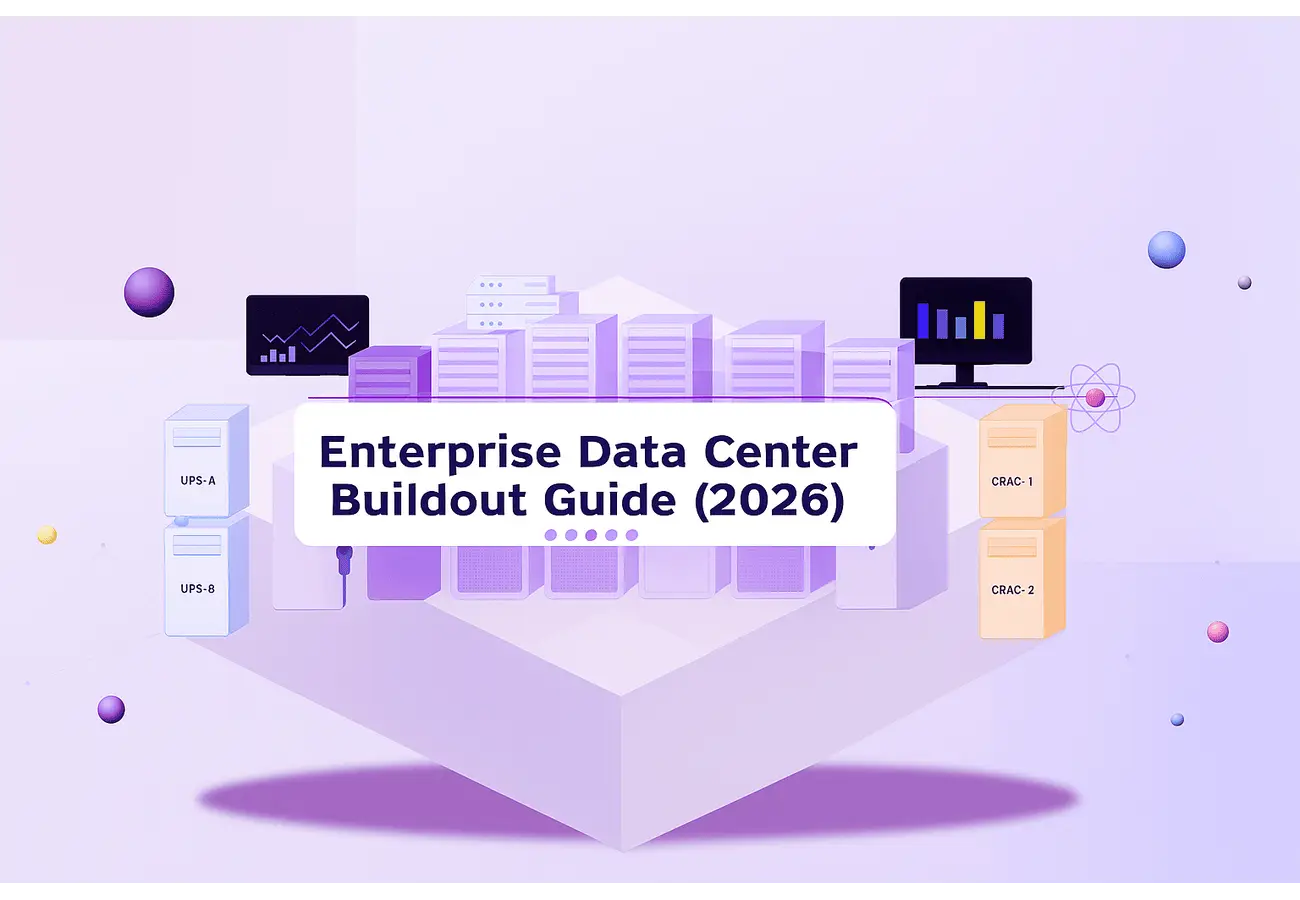
To recommend an effective enterprise data center buildout guide today in 2026 is a different problem than it was five years ago. The hardware profile has changed; AI and GPU workloads have pushed average rack densities past 30 kW and sometimes beyond 100 kW per rack. The risk tolerance has dropped — regulators, SLA commitments, and business continuity requirements now demand Tier III or Tier IV reliability from day one. And the stakes of getting the buildout wrong are higher than ever.
Poor power planning, undersized cooling, or a rushed deployment creates operational debt that costs more to fix than the original build. This enterprise data center buildout guide walks through the entire process: from defining design requirements through core infrastructure decisions, deployment, and the operational model that keeps the facility running.
Whether you are planning a greenfield build, a brownfield expansion, or a major modernization, the decisions made in the buildout phase determine your cost, reliability, and scalability for the next decade.
What Is a Data Center Build-Out and Why It Matters for Enterprise Data Center Strategy?
A data center buildout is the execution phase between design approval and production operations. It covers the physical installation and commissioning of all facility and IT infrastructure: power distribution, cooling plant, server racks, network fabric, and structured cabling, in a space that either starts empty or needs significant reconfiguration.
This is not the same as the design phase. Design sets the intent. Buildout is where that intent is tested, and where gaps in planning show up as expensive change orders or commissioning failures.
The connection to enterprise data center ROI is direct. Teams that treat the buildout as a disciplined engineering program, with staged milestones, formal commissioning tests, and integrated systems validation — consistently deliver on budget and on schedule. Teams that treat it as a procurement exercise find out at the worst possible time that power and cooling were not designed for their actual load profile.
For enterprise data center modernization, the buildout phase also sets the ceiling on how the facility can evolve. Getting the power path, network architecture, and physical layout right in year one is significantly cheaper than retrofitting them in year three.
Enterprise Data Center Buildout Guide: Step-by-Step Planning for Capacity, Power, Cooling, and Workloads
Step 1: Define Workload Profiles Before Budget
Start with your workload profile, not your budget. The most common planning error is sizing a facility around a headline number, say 5 MW, without understanding the density distribution, latency requirements, and growth assumptions that determine your design. Effective data center construction planning builds from those workload assumptions upward instead of working backward from a fixed capex figure. This is where enterprise data center planning becomes real: you are defining the envelope for capacity, risk, and growth that every later decision must respect.
Step 2: Model Capacity & Growth Assumptions
- Model compute demand in three scenarios:
- Baseline
- Three-year projection
- Worst0case acceleration (for example, when an AI or GPU workload expands faster than anticipated).
- Assume at least some high-density zones – 30-50 kW per rack, even if most current load runs at 8-12 kW.
- Revisit these scenarios regularly; they should guide an evolving enterprise data center infrastructure footprint, not a one-timing sizing exercise.
These models inform both your physical design and your long-term enterprise data center strategy for expansion, consolidation, and modernization.
Step 3: Design Data Center Power and Cooling
Per ASHRAE’s thermal guidelines for data processing environments, Class A2 equipment (the majority of enterprise servers) operates within an inlet temperature range of 10–35°C. Your cooling design must sustain that across all failure modes, not just steady state.
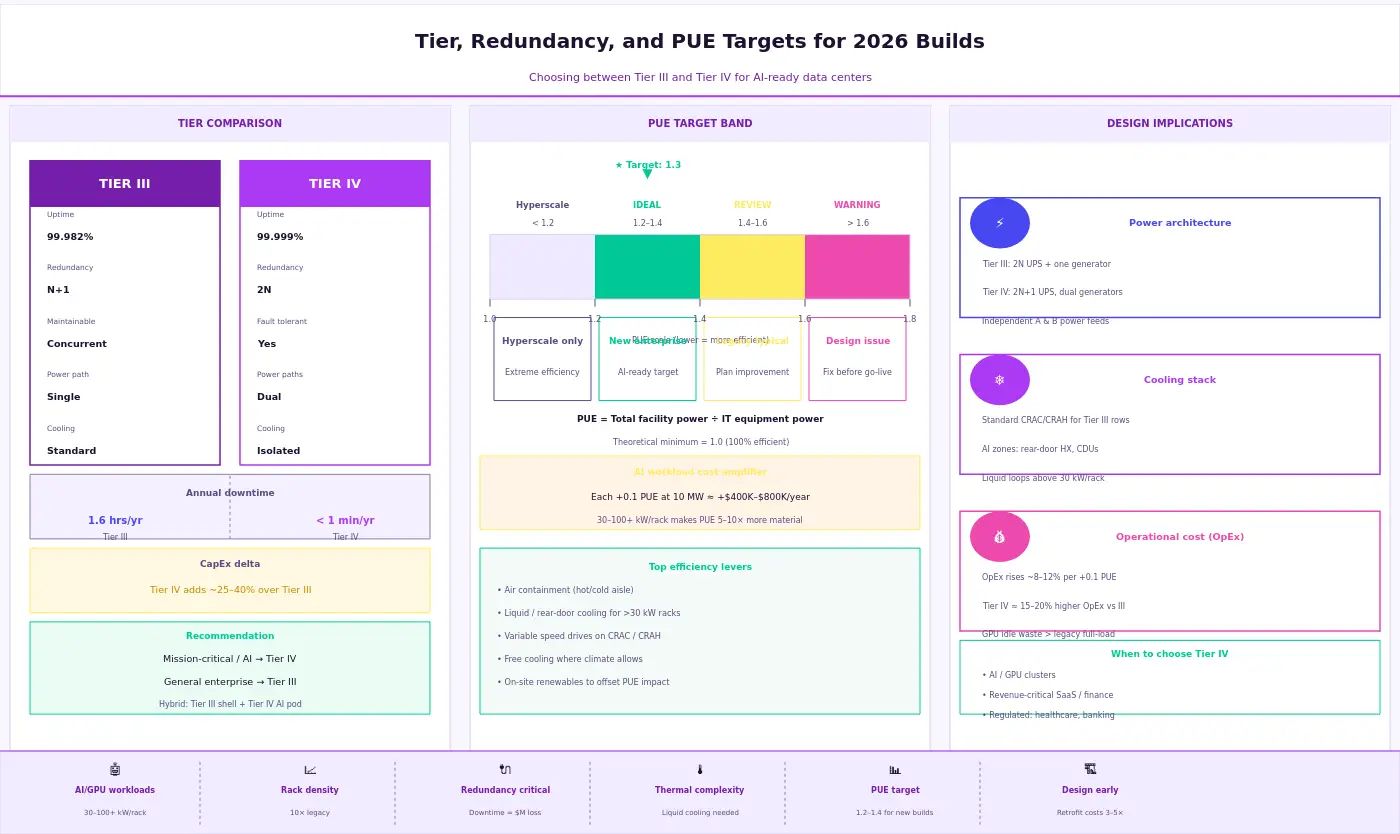
- Align power redundancy with your Tier target:
- N+1 for most Tier III designs
- 2N for Tier IV
- Ensure UPS systems, backup generators, and PDU configurations match the chosen model — a 2N power path with a single‑path UPS defeats the purpose.
- Your overall data center redundancy design — including explicit redundancy (N+1, 2N) models — must be consistent end‑to‑end.
- PUE targets for new enterprise builds typically fall between 1.2 and 1.4; anything materially higher should trigger a design review.
This is also where a partner like Aptly adds value: by validating data center power and cooling design against real AI/GPU load patterns and operating experience from hyperscale and enterprise environments, Aptly helps ensure the design performs as expected once the facility goes live.
Step 4: Map Workload Profiles to Data Center Build Requirements
Mission‑critical workloads — trading platforms, healthcare systems, ERP — need dedicated failure domains and tested failover paths. Latency‑sensitive workloads constrain your physical topology choices. Data residency requirements affect site selection before a single rack is ordered.
Together, these profiles define your data center build requirements at a practical level:
- Which zones need the highest redundancy and isolation
- Which can tolerate brief maintenance windows
- Where future AI/GPU‑heavy deployments are likely to land and therefore need higher density, different cooling, and stricter SLAs
Aptly Technology’s experience operating large GPU and mixed‑workload environments means these workload‑to‑infrastructure mappings are not theoretical; they are tied to how enterprise data centers actually behave in production, which reduces the risk of misalignment between design intent and real‑world operations.
Core Enterprise Data Center Infrastructure: Racks, Power, Cooling, and Network Architecture
This is where enterprise data center design and broader data center architecture design become concrete.
Server Racks and Structured Cabling
Standard 42U open frame server racks remain the baseline, but AI/GPU deployments often push to 48U or 52U configurations to accommodate high wattage nodes. Rack density strategy drives everything downstream: a 50-kW rack requires different power feeds, different cooling, and different cable management than a 10-kW rack.
Structured cabling needs to be planned for growth. Run fiber connectivity to every rack position from day one where the cost difference is minimal at buildout time; the flexibility gain is significant. For the network core, a leaf spine fabric delivers predictable latency and scales horizontally without major redesign.
Power Path: UPS, Generators, and Redundancy
The power architecture runs from the utility transformer through switchgear, UPS systems, backup generators, PDUs, and rack power strips to the device inlet. Each link must be sized for actual load, not nameplate — and your data center redundancy design must be consistent end‑to‑end. Explicitly modeling redundancy (N+1, 2N) along the entire chain helps avoid hidden single points of failure.
Per the Uptime Institute’s Tier Standard, Tier III requires concurrently maintainable power and cooling paths; Tier IV requires full fault tolerance.
Cooling Stack
CRAC / CRAH units remain common in traditional enterprise builds; direct liquid cooling is the right call for GPU-dense zones. Standard hot aisle cold aisle containment is table stakes — open floor plans without containment routinely waste 20–30% of cooling capacity. For high-density deployments, rear door heat exchangers or direct to chip liquid cooling reduce the burden on room level infrastructure significantly.
Summary of core infrastructure decisions by density tier:
| Component | Standard (≤15 kW/rack) | High-Density (30–50 kW/rack) | AI/GPU (100+ kW/rack) |
|---|---|---|---|
| Cooling | CRAC/CRAH, cold aisle containment | CRAH + rear-door HX | Direct liquid / immersion |
| Power redundancy | N+1 UPS, A+B feeds | 2N UPS, redundant PDUs | 2N+1, dedicated power zones |
| Network | ToR switches, 10/25 GbE | Leaf-spine, 25/100 GbE | Leaf-spine, 400 GbE, InfiniBand |
| Cabling | Structured copper + OM4 fiber | OM4/OM5 fiber, pre-terminated | Single-mode fiber, direct attach |
Deployment, Integration, and Validation: Turning Design into a Live Enterprise Data Center
The enterprise data center buildout guide is not complete when the hardware is installed. It is complete when the facility behaves as designed under real conditions.
Physical Deployment and Staging
Stage equipment in a controlled area before moving it to its final position. This catches DOA hardware, firmware mismatches, and cabling errors before they are buried in a rack. For large builds, a phased deployment approach, standing up one pod or zone at a time, gives you operational confidence before you commit the full load.
Integration and Data Center Migration Planning
The integration phase is where most brownfield and data center migration planning work surfaces. If you are expanding into an existing environment, new infrastructure needs to coexist with legacy systems during the transition window. Plan for at least one full integration test cycle in a staging environment before any production workload touches the new infrastructure.
Validation and DCIM Onboarding
Performance baselines, failover testing, and integrated systems testing are non‑negotiable before declaring the facility live. DCIM platforms need to be onboarded during commissioning, not added as an afterthought — late onboarding typically means incomplete asset data, missed sensor configurations, and a management view that does not reflect reality.
Document every deviation from the original design. t drawings are what your operations team inherits — inaccurate documentation is a recurring source of avoidable incidents and undercuts long-term enterprise data center infrastructure reliability.
Operations, Scalability, and How Partners Like Aptly Sustain Enterprise Data Center Efficiency
The buildout ends; the operational life begins. Most of the cost in an enterprise data center is not in the build, it is in the years of power, cooling, maintenance, and staffing that follow.
Monitoring and Uptime
Continuous monitoring through a DCIM platform gives visibility into power consumption, thermal conditions, UPS state, and environmental anomalies before they become failures. Set threshold alerts against your SLA targets, not just hardware limits. The gap between “hardware is within spec” and “SLA is at risk” is often where problems hide.
Capacity Management and Modernization Roadmap
Capacity management is an ongoing discipline. Enterprise data center modernization roadmaps should account for power envelope growth, network bandwidth upgrades, and cooling infrastructure changes that come with higher rack densities.
The build vs colocation data center question does not end at the initial buildout decision. As workloads shift, some to the cloud, some to edge, some expanding on premises, the right mix evolves. Model economics regularly as part of your broader enterprise data center strategy.
Aptly’s Role as an Operations and Scalability Partner
Aptly’s 24×7 Global Operations Centers, direct NVIDIA and Supermicro partnerships, and experience operating tens of thousands of GPU nodes make them a practical operations partner for organizations that want enterprise data center efficiency without staffing the entire function internally.
Aptly Technology delivers up to 99.9% uptime SLAs and can extend the original buildout into a continuously optimized enterprise data center strategy — covering day-to-day operations, power and cooling optimization, migration support, and long-term modernization planning.
Conclusion: Guide for Your Enterprise Data Center
A structured enterprise data center buildout guide matters because the decisions made during buildout are among the most durable in IT — they are baked into the physical infrastructure for years, sometimes decades. Getting power architecture wrong, under sizing cooling for your actual workload, or skipping integrated systems validation does not just create technical debt. It creates operational risk that compounds over time.
The teams that do this well share a few consistent practices: they plan from the workload up rather than the budget down, they hold the design to a consistent Tier standard throughout, and they treat validation as mandatory, not optional.
Your buildout plan should be evaluated against the framework in this guide before procurement begins. Where internal experience is thin — in mechanical engineering, commissioning, or ongoing operations — engaging partners with deep data center infrastructure expertise is a better risk trade‑off than staffing up from scratch.
If you are planning a new build, expansion, or modernization, contact Aptly to discuss how their buildout and managed operations capabilities can support your enterprise data center strategy.
>> See also: GPU Datacenter Buildout Services, AI Infrastructure Managed Services, Managed Data Center Services
Frequently Asked Questions (FAQ):
- What does it cost to build an enterprise data center?
- Enterprise data center build cost — and specifically enterprise data center build cost per MW — ranges widely. A purpose built 1 MW facility typically runs $8–12 million in construction alone, excluding land, power infrastructure, and IT equipment. Larger builds cost $10–15 million per MW or more, depending on Tier target, geographic market, and power availability. According to JLL’s Data Center Outlook, construction costs have risen significantly since 2022 due to supply chain pressure on transformers, switchgear, and cooling equipment.
- How long does it take to build a data center?
- Enterprise data center construction timelines — your effective enterprise data center construction timeline — range from 12 to 36 months depending on greenfield vs. brownfield, utility lead times, and permitting. Modular prefabricated approaches can compress the schedule to 9–18 months in some cases. The longest lead times are typically utility power procurement and custom cooling plant orders — not the construction work itself.
- Should enterprises build or use colocation?
- The build vs colocation data center decision depends on workload control requirements, data residency obligations, long‑term cost modeling, and operational capacity. Colocation is faster to stand up and transfers facility risk. A dedicated build is better when you need full design control, have highly specific power or cooling requirements, or run AI/GPU infrastructure at a scale where per‑kW colocation rates become uncompetitive. Most enterprises use both and treat build vs colocation data center cost as a recurring strategic analysis, not a one‑time choice.
- What is the difference between a Tier 3 and Tier 4 data center?
- Per the Uptime Institute’s Tier Standard, a Tier III data center is concurrently maintainable — all components can be serviced without downtime, targeting 99.982% availability. A Tier IV data center is fault tolerant — a single failure cannot interrupt operations, targeting 99.999% availability. Tier IV costs roughly 20–30% more to build and operate. Most enterprise builds target Tier III; Tier IV is justified for financial systems and critical national infrastructure.
- How much power does a data center need?
- Data center power requirements per rack depend on workload type. General compute runs 5–15 kW per rack; AI/GPU clusters commonly run 30–100+ kW per rack, with some liquid cooled configurations approaching 200 kW. At the facility level, enterprise data centers typically range from 1 MW to 20+ MW of IT load. Your design power envelope should account for 3–5 years of workload growth, not just Day 1 load, and should be a core input into data center power requirements per rack planning.
- What are the key requirements to build a data center?
- Core data center build requirements include: site power availability (utility feeds and backup generation), physical security, structural load capacity (typically 150–300 lbs/sq ft), diverse fiber connectivity paths, sufficient cooling capacity (BTU/hr removal), and regulatory compliance with local codes and environmental standards. For AI‑dense builds, cooling capacity is increasingly the binding constraint — not power availability or floor space.
Table of content
- TL; DR
- What Is a Data Center Build-Out and Why It Matters for Enterprise Data Center Strategy?
- Enterprise Data Center Buildout Guide: Step-by-Step Planning for Capacity, Power, Cooling, and Workloads
- Core Enterprise Data Center Infrastructure: Racks, Power, Cooling, and Network Architecture
- Deployment, Integration, and Validation: Turning Design into a Live Enterprise Data Center
- Operations, Scalability, and How Partners Like Aptly Sustain Enterprise Data Center Efficiency
- Conclusion: Guide for Your Enterprise Data Center
- Frequently Asked Questions (FAQ):